> ## Documentation Index
> Fetch the complete documentation index at: https://help-loyalife.xoxoday.com/llms.txt
> Use this file to discover all available pages before exploring further.
# Communications
> Build and manage notification templates across Email, SMS, WhatsApp, and Push triggered by loyalty events or campaigns.
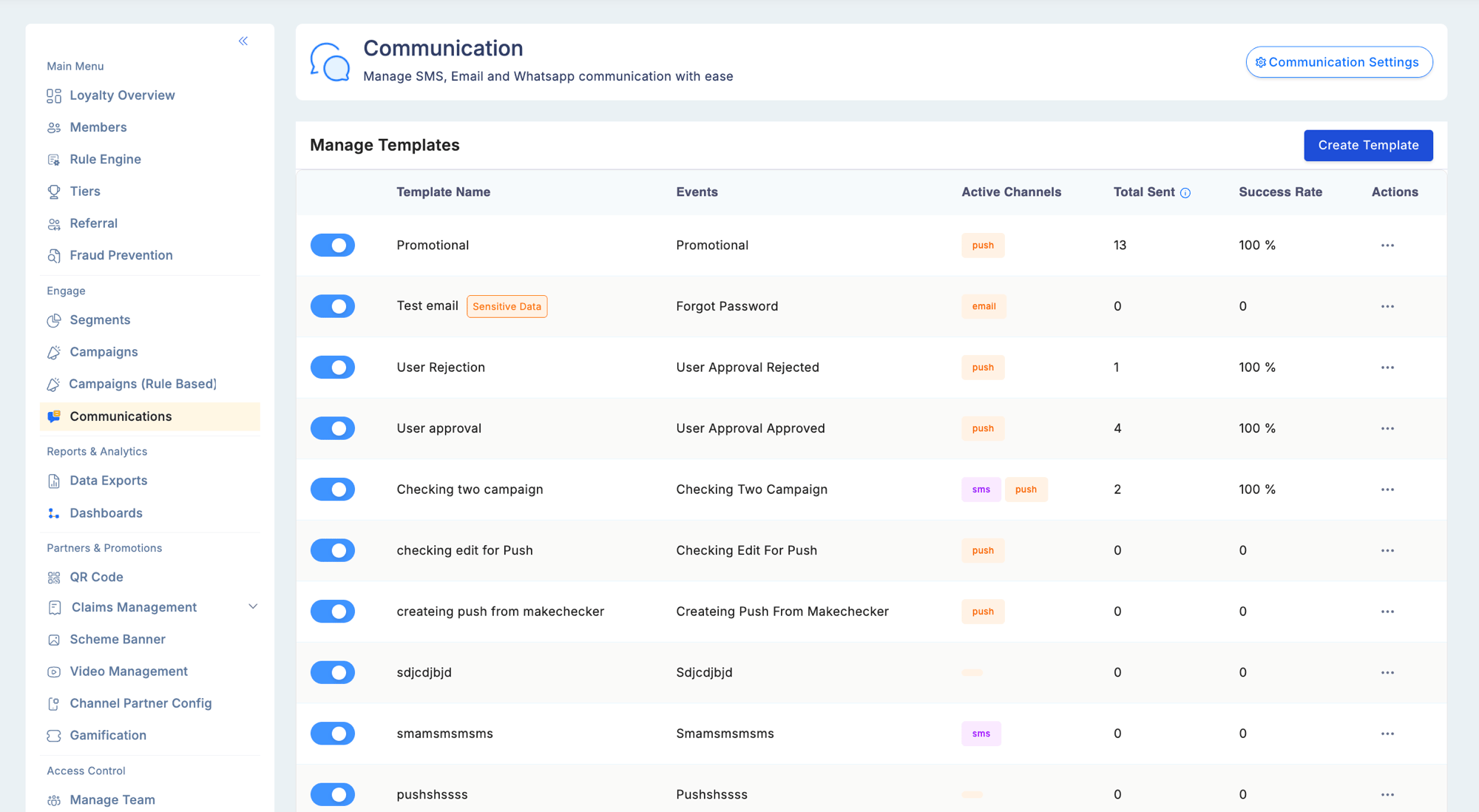
The Communications module is where you build and manage all member-facing message templates. Templates fire automatically when a loyalty event occurs (transactional) or are dispatched by a campaign targeting a specific member segment (promotional).
## Supported channels
| Channel | Provider | Details |
| -------------------------------------------------- | ------------------------------- | --------------------------------------------------------- |
| [**Email**](/user-guides/engage/email) | SendGrid (by Twilio) | Rich HTML; drag-and-drop editor; images, buttons, layouts |
| [**SMS**](/user-guides/engage/sms) | Plivo (India); varies by region | Plain text; DLT registration required for India |
| [**WhatsApp**](/user-guides/engage/whatsapp) | Configurable WABA gateway | Pre-approved templates only; template ID required |
| [**Push**](/user-guides/engage/push-notifications) | Firebase Cloud Messaging (FCM) | Requires Loyalife mobile app installed on device |
Each channel can be independently enabled per template. A single template can send across all four channels simultaneously.
## Template types
| Type | How it fires |
| ----------------- | ---------------------------------------------------------------------------------------------------------------- |
| **Transactional** | Fires automatically when a specific loyalty event occurs — immediately, no scheduling required |
| **Promotional** | Attached to a campaign; dispatched to a segment immediately on campaign activation or at a scheduled future date |
## Creating a template
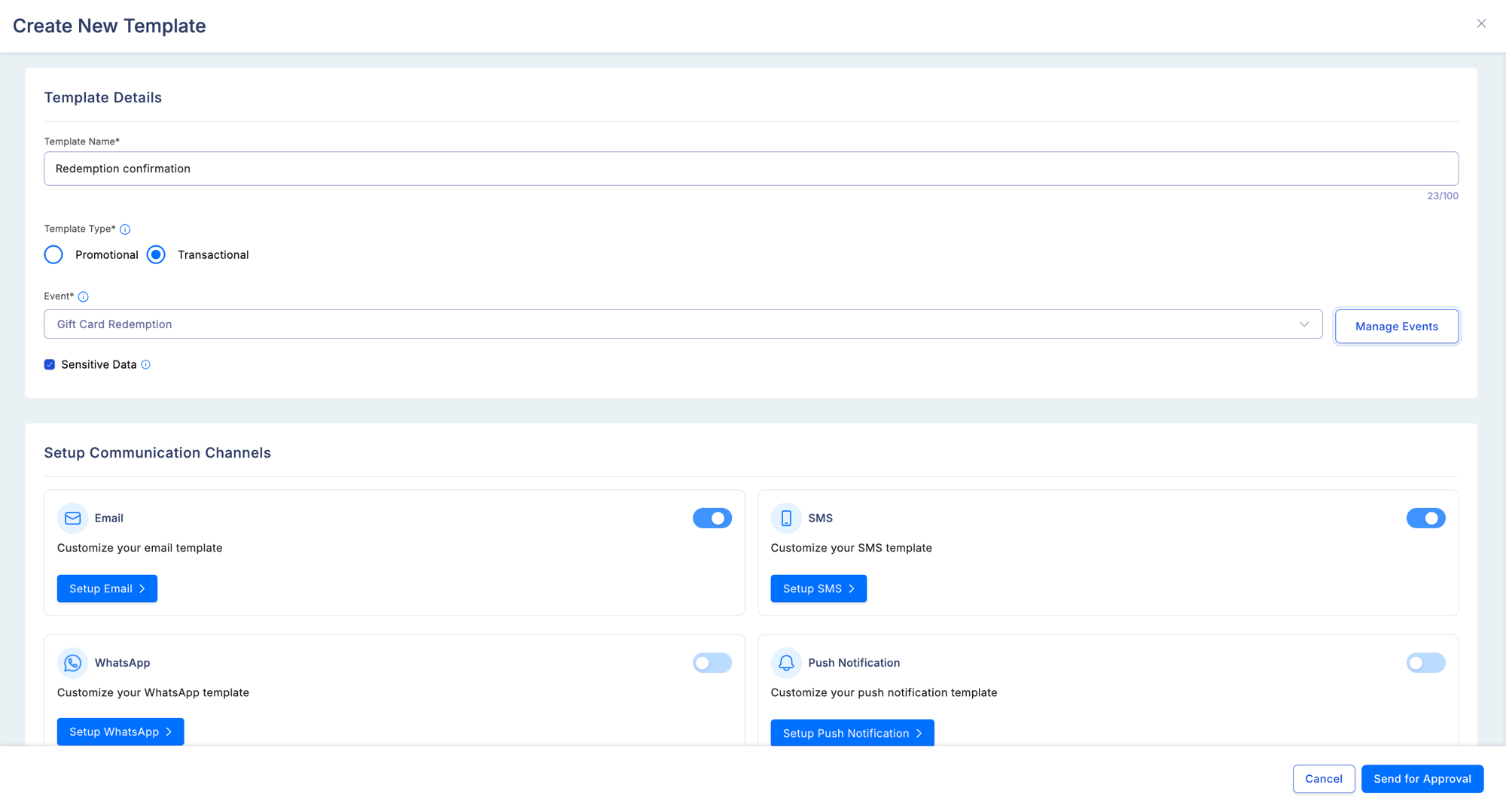
 Select **Transactional** or **Promotional**. This determines whether you pick a trigger event or link to a campaign.
Pick the loyalty event that will send this message. Each event supports one active template per channel.
Toggle on each channel — Email, SMS, WhatsApp, Push. Each has its own content section.
See the per-channel pages for field requirements, character limits, and constraints.
Leave blank to send immediately when the campaign activates, or pick a future date within the campaign window.
If Maker-Checker is enabled for Communications, saving creates a pending approval request. The template does not go live until an approver authorises it.
Select **Transactional** or **Promotional**. This determines whether you pick a trigger event or link to a campaign.
Pick the loyalty event that will send this message. Each event supports one active template per channel.
Toggle on each channel — Email, SMS, WhatsApp, Push. Each has its own content section.
See the per-channel pages for field requirements, character limits, and constraints.
Leave blank to send immediately when the campaign activates, or pick a future date within the campaign window.
If Maker-Checker is enabled for Communications, saving creates a pending approval request. The template does not go live until an approver authorises it.
 ## Trigger events
### Member lifecycle
| Event | Description |
| ----------------------- | ------------------------------------------- |
| `member_activation` | Member account is activated |
| `member_otp` | OTP sent for login or verification |
| `two_factor_otp` | OTP sent for two-factor authentication |
| `user_access_shared` | Admin user is invited to the program |
| `role_modified` | A user's role is changed |
| `pending_maker_checker` | A Maker-Checker approval request is pending |
### Points and transactions
| Event | Description |
| ----------------------- | ----------------------------------------------------- |
| `points_accrual` | Points credited after a qualifying transaction |
| `points_redeemed` | Member completes a redemption |
| `point_reversal` | A previously credited transaction is reversed |
| `points_expiring` | Points approaching expiry (triggered N days before) |
| `points_expired` | Points have expired |
| `bonus_points_credited` | Bonus points awarded (campaign, milestone, or manual) |
| `gift_card_redemption` | Member redeems a gift card |
### Tier events
| Event | Description |
| ----------------- | --------------------------------------------------- |
| `tier_upgraded` | Member's tier increases |
| `tier_downgraded` | Member's tier decreases |
| `tier_retained` | Member's tier is retained during a retention period |
### Referral events
| Event | Description |
| ------------------------- | ------------------------------------------------- |
| `referral_completed` | A referred member completes the qualifying action |
| `referral_bonus_credited` | Referral reward is credited to the referrer |
### Channel partner events
| Event | Description |
| --------------------- | -------------------------------------- |
| `onboarding_approved` | Partner account approved and activated |
| `onboarding_rejected` | Partner registration rejected |
| `claim_approved` | Partner invoice claim approved |
| `claim_rejected` | Partner invoice claim rejected |
| `new_scheme_launched` | A new earning scheme is made available |
### Fraud and compliance
| Event | Description |
| ------------------------- | ---------------------------------------------------- |
| `pending_fraud_review` | A transaction has been flagged and is pending review |
| `redemption_fraud_review` | A redemption transaction has been flagged for review |
Adding new custom events is managed by the Loyalife team during program setup and is not currently self-serve.
## Dynamic variables
Use `{{variable_name}}` syntax anywhere in template content. Available variables:
| Variable | Value |
| ------------------------ | --------------------------------------------- |
| `{{member_name}}` | Member's full name |
| `{{points_balance}}` | Current points balance |
| `{{tier_name}}` | Current tier name |
| `{{points_earned}}` | Points credited in the triggering transaction |
| `{{points_redeemed}}` | Points redeemed in the current transaction |
| `{{expiry_date}}` | Date when points expire |
| `{{referral_code}}` | Member's referral code |
| `{{transaction_amount}}` | Transaction value that triggered the event |
| `{{merchant_name}}` | Merchant where the transaction occurred |
| `{{bonus_points}}` | Bonus points awarded in this event |
| `{{program_name}}` | The loyalty program's name |
| `{{otp}}` | One-time password (OTP events only) |
## Multi-language templates
Each template supports a primary language and one or more secondary languages. Loyalife selects the correct variant at send time based on the member's **Preferred Language** attribute. Secondary language templates are configured per channel independently.
## Communication settings
## Trigger events
### Member lifecycle
| Event | Description |
| ----------------------- | ------------------------------------------- |
| `member_activation` | Member account is activated |
| `member_otp` | OTP sent for login or verification |
| `two_factor_otp` | OTP sent for two-factor authentication |
| `user_access_shared` | Admin user is invited to the program |
| `role_modified` | A user's role is changed |
| `pending_maker_checker` | A Maker-Checker approval request is pending |
### Points and transactions
| Event | Description |
| ----------------------- | ----------------------------------------------------- |
| `points_accrual` | Points credited after a qualifying transaction |
| `points_redeemed` | Member completes a redemption |
| `point_reversal` | A previously credited transaction is reversed |
| `points_expiring` | Points approaching expiry (triggered N days before) |
| `points_expired` | Points have expired |
| `bonus_points_credited` | Bonus points awarded (campaign, milestone, or manual) |
| `gift_card_redemption` | Member redeems a gift card |
### Tier events
| Event | Description |
| ----------------- | --------------------------------------------------- |
| `tier_upgraded` | Member's tier increases |
| `tier_downgraded` | Member's tier decreases |
| `tier_retained` | Member's tier is retained during a retention period |
### Referral events
| Event | Description |
| ------------------------- | ------------------------------------------------- |
| `referral_completed` | A referred member completes the qualifying action |
| `referral_bonus_credited` | Referral reward is credited to the referrer |
### Channel partner events
| Event | Description |
| --------------------- | -------------------------------------- |
| `onboarding_approved` | Partner account approved and activated |
| `onboarding_rejected` | Partner registration rejected |
| `claim_approved` | Partner invoice claim approved |
| `claim_rejected` | Partner invoice claim rejected |
| `new_scheme_launched` | A new earning scheme is made available |
### Fraud and compliance
| Event | Description |
| ------------------------- | ---------------------------------------------------- |
| `pending_fraud_review` | A transaction has been flagged and is pending review |
| `redemption_fraud_review` | A redemption transaction has been flagged for review |
Adding new custom events is managed by the Loyalife team during program setup and is not currently self-serve.
## Dynamic variables
Use `{{variable_name}}` syntax anywhere in template content. Available variables:
| Variable | Value |
| ------------------------ | --------------------------------------------- |
| `{{member_name}}` | Member's full name |
| `{{points_balance}}` | Current points balance |
| `{{tier_name}}` | Current tier name |
| `{{points_earned}}` | Points credited in the triggering transaction |
| `{{points_redeemed}}` | Points redeemed in the current transaction |
| `{{expiry_date}}` | Date when points expire |
| `{{referral_code}}` | Member's referral code |
| `{{transaction_amount}}` | Transaction value that triggered the event |
| `{{merchant_name}}` | Merchant where the transaction occurred |
| `{{bonus_points}}` | Bonus points awarded in this event |
| `{{program_name}}` | The loyalty program's name |
| `{{otp}}` | One-time password (OTP events only) |
## Multi-language templates
Each template supports a primary language and one or more secondary languages. Loyalife selects the correct variant at send time based on the member's **Preferred Language** attribute. Secondary language templates are configured per channel independently.
## Communication settings
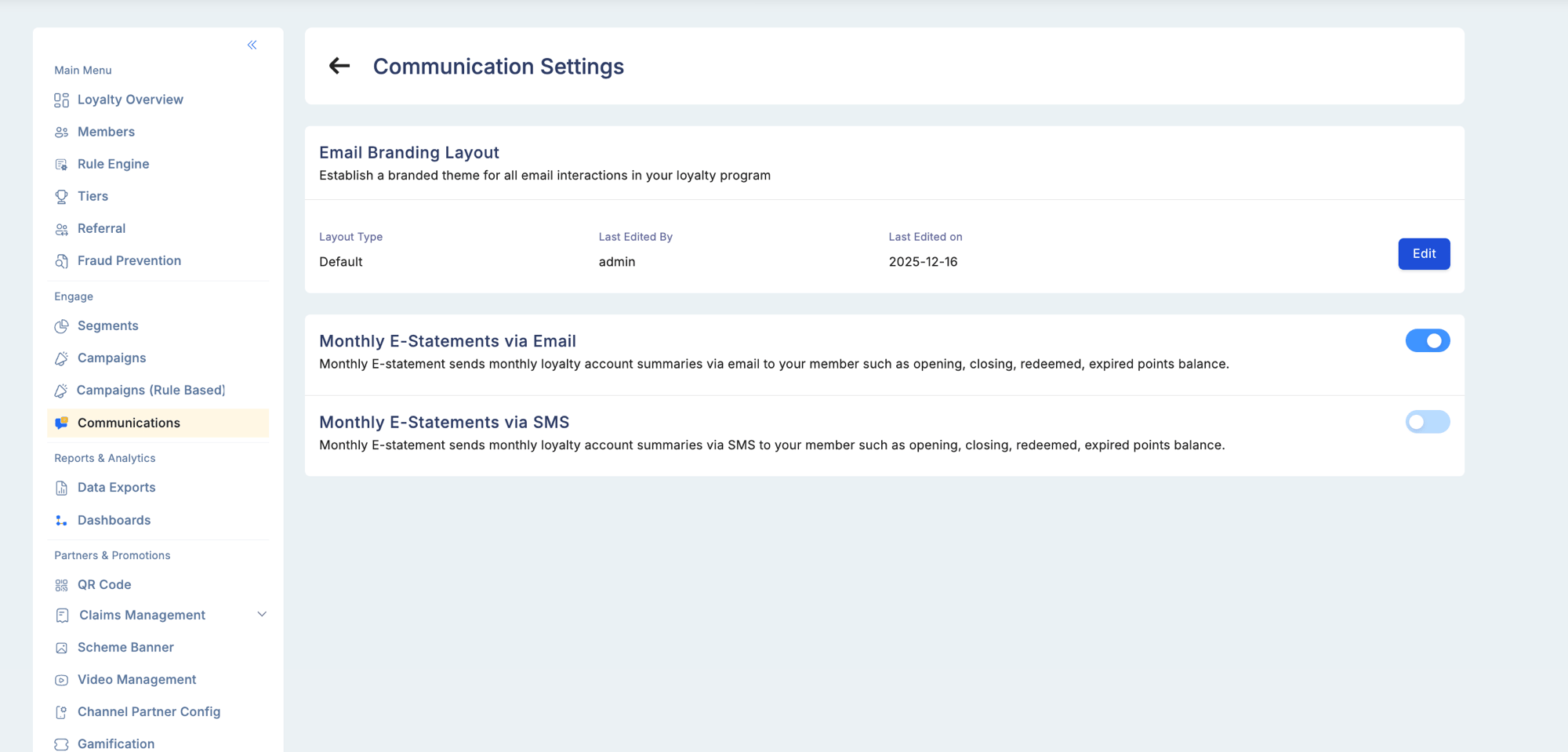 Navigate to **Engage → Communications → Settings** to configure program-wide communication preferences, including email branding layouts and monthly e-statement delivery options.
## Delivery history and resend
From a member's profile, go to **Account Info → Communications** to see the full delivery log across Email, SMS, and WhatsApp. From this view you can resend any notification directly to the member or view the content of what was sent (hidden for templates marked Sensitive).
## Permissions
| Permission | What it allows |
| ---------- | ------------------------------------------------------- |
| View | Review existing templates and delivery metrics |
| Edit | Modify template content, variables, and scheduled dates |
| Create | Create, modify, and delete templates |
Navigate to **Engage → Communications → Settings** to configure program-wide communication preferences, including email branding layouts and monthly e-statement delivery options.
## Delivery history and resend
From a member's profile, go to **Account Info → Communications** to see the full delivery log across Email, SMS, and WhatsApp. From this view you can resend any notification directly to the member or view the content of what was sent (hidden for templates marked Sensitive).
## Permissions
| Permission | What it allows |
| ---------- | ------------------------------------------------------- |
| View | Review existing templates and delivery metrics |
| Edit | Modify template content, variables, and scheduled dates |
| Create | Create, modify, and delete templates |