> ## Documentation Index
> Fetch the complete documentation index at: https://help-loyalife.xoxoday.com/llms.txt
> Use this file to discover all available pages before exploring further.
# Member details
> A guide to every tab in the Loyalife member detail view covering account info, accrual history, statements, redemptions, transaction summaries, expiry schedules, communications, and referrals.
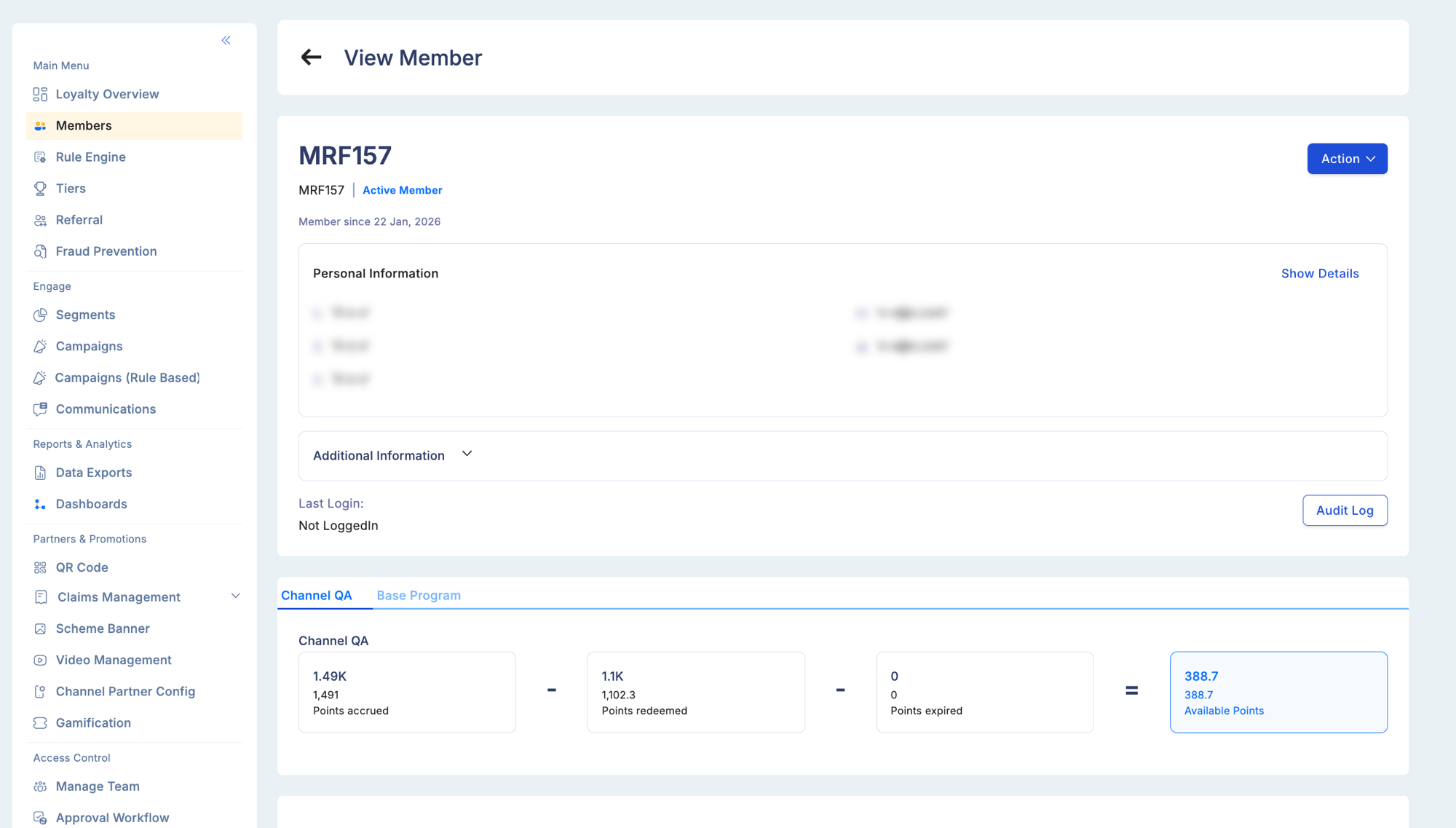
The member detail view is the single pane of glass for an individual member's account. From here you can review identity information, loyalty activity, communication history, and referral activity — and take actions such as manual point adjustments or status changes.
## Opening a member profile
Navigate to **Members**, then use search (relation reference, full name, email, or phone) or browse the member list. Click **Actions → View** to open the detail view.
 ## Tab overview
The member detail view has eight tabs. Each covers a distinct dimension of the member's account.
| Tab | What it shows |
| ------------------------------------------- | --------------------------------------------------------------------------- |
| [Account Info](#account-info) | Identity, status, tier, segments, and action buttons |
| [Accrual Info](#accrual-info) | Point balance breakdown and full earning transaction history |
| [Member Statement](#member-statement) | Formatted statement view — credits, debits, and net movement for any period |
| [Member Redemption](#member-redemption) | Every redemption event with channel, status, and reference |
| [Transaction Summary](#transaction-summary) | Aggregated spend and transaction metrics (lifetime, MTD, QTD, YTD) |
| [Expiry Schedule](#expiry-schedule) | Upcoming and past points expiry batches |
| [Communication](#communication) | Full history of messages sent to this member across all channels |
| [Referral](#referral) | Referrals made by this member and the referral that brought them in |
Not all tabs may be visible for every user. Tab visibility depends on role permissions and enabled modules:
* **Referral** tab is hidden if the Referrals module is not enabled in Configuration → Modules
* **Communication** tab requires the Communications permission in your role
* **Accrual Info**, **Member Statement**, and **Member Redemption** require the View Member Transactions permission
* **Expiry Schedule** requires points expiry to be configured for the program
If a tab you expect is not visible, check your role permissions under Access Control → Manage Team → Roles.
***
## Account Info
The primary identity and status panel.
**Member identification:**
| Field | Description |
| ------------------ | -------------------------------------------------------------------------- |
| Relation Reference | Your program's unique member identifier (CIF number, account number, etc.) |
| Full Name | First + last name |
| Mobile Number | Registered phone |
| Email Address | Registered email |
| Gender | As recorded at enrollment |
| Date of Birth | Used for birthday rules and KYC |
| Status | Current account status (see below) |
**Account statuses:**
| Status code | Label | Meaning |
| :---------: | ------------------ | ------------------------------------------------------- |
| 1 | Active | Account is in good standing; member can earn and redeem |
| 2 | Suspended | Temporarily restricted — cannot earn or redeem |
| 3 | Login Blocked | Account exists but mobile login is blocked |
| 4 | Canceled | Account has been permanently closed |
| 5 | InActive | Enrolled but never activated |
| 6 | Membership Blocked | Membership-level block separate from login |
**Tier and segment information:**
| Field | Description |
| ------------ | --------------------------------------------- |
| Current Tier | Tier name and icon |
| Segments | All segments this member currently belongs to |
**Program dates:**
| Field | Description |
| ------------------ | ---------------------------------------- |
| Enrollment Date | When the member was added to the program |
| Activation Date | When the account was first activated |
| Last Activity Date | Date of the most recent transaction |
**Action buttons available from this tab:**
* **Edit** — update contact details or profile fields (subject to your role permissions)
* **Change Status** — suspend, block, re-activate, or cancel the account (enters Maker-Checker queue if workflow is enabled)
* **Manual Adjust Points** — initiate a manual point credit or debit
***
## Accrual Info
Shows the member's point-earning history and a real-time balance breakdown.
**Balance summary:**
| Metric | Description |
| ---------------------- | --------------------------------------------------------- |
| Current Balance | Points available to redeem right now |
| Lifetime Points Earned | Total points accrued since enrollment |
| Points Redeemed | Cumulative redemptions |
| Points Expired | Points that have lapsed |
| Pending Points | Earned but not yet posted (held during processing window) |
**Accrual transaction history:**
Every individual earn and debit event is listed in reverse-chronological order.
| Column | Description |
| ------------------------------ | --------------------------------------------------------------------------------------------------------------------------- |
| Transaction Date | When the earning event occurred |
| Narration | Description of the activity — e.g., "Spend Points", "Campaign Bonus", "Expired Points" |
| Transaction Type (TT) | 1 = Credit, 2 = Debit |
| Loyalty Transaction Type (LTT) | The specific activity category — see [Transaction types](/user-guides/rule-engine/transaction-types) for the full reference |
| Points | Points earned (positive) or debited (negative) |
| Balance After | Running balance after this entry |
| Rule Applied | The Rule Engine rule that matched this transaction |
**Filter options:**
| Filter | Options |
| ---------------- | -------------------------------------------- |
| Date range | Custom start and end dates |
| Transaction Type | Credit (TT 1), Debit (TT 2), Reversal (TT 4) |
Use this tab to verify that a specific purchase triggered the right rule and awarded the correct points.
***
## Member Statement
A period-based formatted view of the member's account — equivalent to a bank statement for their points balance.
**What's shown:**
* Every credit and debit event in the selected period, in chronological order
* Opening balance at the start of the period
* Closing balance at the end of the period
* Net movement (total credits minus total debits)
**Filter options:**
| Filter | Options |
| ---------------- | -------------------------------------------- |
| Date range | Custom start and end dates |
| Transaction Type | Credit (TT 1), Debit (TT 2), Reversal (TT 4) |
**Downloading:**
Export the statement directly from this tab as CSV or PDF. Use this when a member disputes their balance or needs a formal points statement for compliance or audit purposes.
Member Statement and Accrual Info both show transaction history. The difference is context: Accrual Info shows raw transaction-level detail for investigation, while Member Statement shows a formatted period view with opening/closing balances — more suitable for sharing with the member.
***
## Member Redemption
Tracks every redemption event for this member — what was redeemed, when, how many points, and the outcome.
**Redemption history columns:**
| Column | Description |
| -------------------- | -------------------------------------------------------------------- |
| Redemption Date | When the redemption was processed |
| Reward Name | Voucher, gift card, or reward item name |
| Points Debited | Points consumed by this redemption |
| Channel | Plum marketplace, in-store POS, API |
| Status | Completed, Pending, Reversed |
| Redemption Reference | Unique identifier for cross-referencing with Plum or partner systems |
Use this tab to investigate disputed redemptions — confirm whether the debit was processed, on what date, and through which channel.
***
## Transaction Summary
An aggregated view of the member's transaction activity — a quick health check on engagement without scrolling through individual entries.
**Summary metrics:**
| Metric | Description |
| ------------------------- | ------------------------------------------------ |
| Total transactions | Lifetime count of all transactions |
| Total spend amount | Cumulative transaction value in program currency |
| Average transaction value | Mean spend per transaction |
| Last transaction date | Date of the most recent transaction |
| Transactions this month | Count for the current calendar month |
| Transactions this quarter | Count for the current quarter |
| Transactions this year | Count for the current year |
The figures shown here are the same values that feed aggregate attributes in the Rule Engine. If a rule condition checks "Monthly Transaction Count", the figure shown under "Transactions this month" is what gets evaluated.
***
## Expiry Schedule
Shows upcoming and past points expiry events for this member — essential for support agents advising members on expiring balances.
**Expiry schedule columns:**
| Column | Description |
| ------------ | ------------------------------------------------------- |
| Point Batch | The batch of points scheduled to expire |
| Points | Amount in this expiry batch |
| Expiry Date | Scheduled expiry date |
| Status | Upcoming, Expired, or Canceled (if expiry was reversed) |
| Earning Date | When this batch was originally credited |
Expiry is calculated from either the **Processing Date** (when points were posted to the ledger) or the **Point Availability Date** (when points became redeemable), depending on your program's Point Definition configuration.
Use this tab proactively in member support conversations — if a large batch is expiring soon, advise the member to redeem before the expiry date, or flag the account for a re-engagement campaign.
***
## Communication
A complete log of every message sent to this member through Loyalife's communication channels.
**Communication log columns:**
| Column | Description |
| ------------- | ------------------------------------------------------------------------------------ |
| Sent Date | When the message was dispatched |
| Channel | Email, SMS, WhatsApp, Push Notification |
| Template | The communication template that was used |
| Trigger Event | The event that triggered the message (e.g., Points Credited, Tier Upgrade, Campaign) |
| Status | Delivered, Failed, Pending |
Use this tab to:
* Confirm whether a member received a specific notification (e.g., tier upgrade, campaign reward)
* Investigate a reported missing message — check Delivered vs. Failed status
* Audit the complete communication history for compliance or dispute resolution
***
## Referral
Tracks this member's referral activity — as a referrer sending others to the program, and as a referee who was brought in by someone else.
**Referral summary:**
| Metric | Description |
| ---------------------------- | ----------------------------------------------------------------------------- |
| Total referrals made | How many people this member has referred |
| Successful referrals | Referrals that met the qualifying condition (enrollment or first transaction) |
| Total referral reward earned | Points earned from successful referrals |
| Referred by | The member who referred this person (if applicable) |
**Referral history table:**
| Column | Description |
| ---------------- | -------------------------------------------------- |
| Referred Member | Name and relation reference of the person referred |
| Referral Date | When the referral was made |
| Qualifying Event | On Enrollment or On First Transaction |
| Status | Pending, Qualified, Rewarded |
| Reward Points | Points credited to this member for the referral |
The Referral tab only appears if the Referrals module is enabled in **Configuration → Modules**. If referrals are not configured for your program, this tab is hidden.
***
## Actions from the member profile
### Manual point adjustments
Available from the Account Info tab, in the action panel at the top right.
Select Credit (add points) or Debit (remove points). Enter the point amount and a mandatory reason.
Choose the Loyalty Transaction Type (LTT) that best describes the adjustment — e.g., Bonus for a goodwill grant, Miscellaneous for a correction.
If Maker-Checker is enabled for Manual Points, the request enters the approval queue. If not, the adjustment posts immediately.
Manual point adjustments bypass the Rule Engine — no rules fire and no aggregate counts are updated. The adjustment does not take effect until an approver acts on it if the Maker-Checker workflow is enabled.
Manual adjustments produce different ledger entries depending on direction and narration:
* **Credit adjustments** → [Credit By Bonus](/user-guides/reports/report-types#credit-by-bonus) (e.g., goodwill grant, correction top-up)
* **Debit adjustments** → [Debit By Bonus](/user-guides/reports/report-types#debit-by-bonus) (e.g., over-credit correction)
* **Accrual reversal** → [Debit By Reversal](/user-guides/reports/report-types#debit-by-reversal)
* **Redemption reversal** → [Redemption Reversal](/user-guides/reports/report-types#redemption-reversal) (restores previously debited points)
* **Reversal of a debit** → [Credit By Reversal](/user-guides/reports/report-types#credit-by-reversal)
All of these are visible in the member's transaction history and filterable under Transactional reports.
### Changing member status
| Action | New status | Reversible? | Use case |
| ---------------- | ---------------------- | :---------: | ------------------------------------------------------ |
| Suspend | Suspended (2) | Yes | Temporary restriction — member cannot earn or redeem |
| Block Login | Login Blocked (3) | Yes | Block mobile app access while keeping the account open |
| Block Membership | Membership Blocked (6) | Yes | Membership-level restriction while preserving login |
| Activate | Active (1) | — | Re-activate a suspended or blocked member |
| Cancel | Canceled (4) | No | Permanently close the account |
Status changes may require Maker-Checker approval depending on your program configuration.
### Accessing personal information
Viewing raw personal data (mobile number, email, date of birth, address) requires a confirmation prompt. Every admin who accesses this data is logged in the Audit Trail for compliance accountability.
PI Data Access is a separate role permission. If you do not have this permission, personal data fields are masked regardless of your other role rights.
### Linked cards and accounts
When card and account linking is enabled in Advanced Configuration, the Account Info tab shows a **View Linked Cards & Accounts** button revealing:
* Card / account numbers
* Sub-relationship classification
* Account status
* Member relationship reference ID
This button only appears if CRD linking is enabled for your program.
***
## Troubleshooting
**Recent transactions are not showing in Accrual Info.**
* Batch file transactions have a processing delay — the transaction date on the file and the posting date may differ. Widen the date filter to cover the full range.
**Points balance does not match the Member Statement total.**
* Pending points are excluded from the available balance but visible in Accrual Info as Pending entries.
* Look for Reversal entries — they reduce the balance without being debited transactions.
**Referral tab is not visible.**
* The Referrals module is likely not enabled. Check **Configuration → Modules**.
**Communication tab shows Delivered but the member reports not receiving the message.**
* "Delivered" is the gateway status, not end-device confirmation. Check spam folders for email, and confirm the carrier isn't filtering automated SMS sender IDs.
## Tab overview
The member detail view has eight tabs. Each covers a distinct dimension of the member's account.
| Tab | What it shows |
| ------------------------------------------- | --------------------------------------------------------------------------- |
| [Account Info](#account-info) | Identity, status, tier, segments, and action buttons |
| [Accrual Info](#accrual-info) | Point balance breakdown and full earning transaction history |
| [Member Statement](#member-statement) | Formatted statement view — credits, debits, and net movement for any period |
| [Member Redemption](#member-redemption) | Every redemption event with channel, status, and reference |
| [Transaction Summary](#transaction-summary) | Aggregated spend and transaction metrics (lifetime, MTD, QTD, YTD) |
| [Expiry Schedule](#expiry-schedule) | Upcoming and past points expiry batches |
| [Communication](#communication) | Full history of messages sent to this member across all channels |
| [Referral](#referral) | Referrals made by this member and the referral that brought them in |
Not all tabs may be visible for every user. Tab visibility depends on role permissions and enabled modules:
* **Referral** tab is hidden if the Referrals module is not enabled in Configuration → Modules
* **Communication** tab requires the Communications permission in your role
* **Accrual Info**, **Member Statement**, and **Member Redemption** require the View Member Transactions permission
* **Expiry Schedule** requires points expiry to be configured for the program
If a tab you expect is not visible, check your role permissions under Access Control → Manage Team → Roles.
***
## Account Info
The primary identity and status panel.
**Member identification:**
| Field | Description |
| ------------------ | -------------------------------------------------------------------------- |
| Relation Reference | Your program's unique member identifier (CIF number, account number, etc.) |
| Full Name | First + last name |
| Mobile Number | Registered phone |
| Email Address | Registered email |
| Gender | As recorded at enrollment |
| Date of Birth | Used for birthday rules and KYC |
| Status | Current account status (see below) |
**Account statuses:**
| Status code | Label | Meaning |
| :---------: | ------------------ | ------------------------------------------------------- |
| 1 | Active | Account is in good standing; member can earn and redeem |
| 2 | Suspended | Temporarily restricted — cannot earn or redeem |
| 3 | Login Blocked | Account exists but mobile login is blocked |
| 4 | Canceled | Account has been permanently closed |
| 5 | InActive | Enrolled but never activated |
| 6 | Membership Blocked | Membership-level block separate from login |
**Tier and segment information:**
| Field | Description |
| ------------ | --------------------------------------------- |
| Current Tier | Tier name and icon |
| Segments | All segments this member currently belongs to |
**Program dates:**
| Field | Description |
| ------------------ | ---------------------------------------- |
| Enrollment Date | When the member was added to the program |
| Activation Date | When the account was first activated |
| Last Activity Date | Date of the most recent transaction |
**Action buttons available from this tab:**
* **Edit** — update contact details or profile fields (subject to your role permissions)
* **Change Status** — suspend, block, re-activate, or cancel the account (enters Maker-Checker queue if workflow is enabled)
* **Manual Adjust Points** — initiate a manual point credit or debit
***
## Accrual Info
Shows the member's point-earning history and a real-time balance breakdown.
**Balance summary:**
| Metric | Description |
| ---------------------- | --------------------------------------------------------- |
| Current Balance | Points available to redeem right now |
| Lifetime Points Earned | Total points accrued since enrollment |
| Points Redeemed | Cumulative redemptions |
| Points Expired | Points that have lapsed |
| Pending Points | Earned but not yet posted (held during processing window) |
**Accrual transaction history:**
Every individual earn and debit event is listed in reverse-chronological order.
| Column | Description |
| ------------------------------ | --------------------------------------------------------------------------------------------------------------------------- |
| Transaction Date | When the earning event occurred |
| Narration | Description of the activity — e.g., "Spend Points", "Campaign Bonus", "Expired Points" |
| Transaction Type (TT) | 1 = Credit, 2 = Debit |
| Loyalty Transaction Type (LTT) | The specific activity category — see [Transaction types](/user-guides/rule-engine/transaction-types) for the full reference |
| Points | Points earned (positive) or debited (negative) |
| Balance After | Running balance after this entry |
| Rule Applied | The Rule Engine rule that matched this transaction |
**Filter options:**
| Filter | Options |
| ---------------- | -------------------------------------------- |
| Date range | Custom start and end dates |
| Transaction Type | Credit (TT 1), Debit (TT 2), Reversal (TT 4) |
Use this tab to verify that a specific purchase triggered the right rule and awarded the correct points.
***
## Member Statement
A period-based formatted view of the member's account — equivalent to a bank statement for their points balance.
**What's shown:**
* Every credit and debit event in the selected period, in chronological order
* Opening balance at the start of the period
* Closing balance at the end of the period
* Net movement (total credits minus total debits)
**Filter options:**
| Filter | Options |
| ---------------- | -------------------------------------------- |
| Date range | Custom start and end dates |
| Transaction Type | Credit (TT 1), Debit (TT 2), Reversal (TT 4) |
**Downloading:**
Export the statement directly from this tab as CSV or PDF. Use this when a member disputes their balance or needs a formal points statement for compliance or audit purposes.
Member Statement and Accrual Info both show transaction history. The difference is context: Accrual Info shows raw transaction-level detail for investigation, while Member Statement shows a formatted period view with opening/closing balances — more suitable for sharing with the member.
***
## Member Redemption
Tracks every redemption event for this member — what was redeemed, when, how many points, and the outcome.
**Redemption history columns:**
| Column | Description |
| -------------------- | -------------------------------------------------------------------- |
| Redemption Date | When the redemption was processed |
| Reward Name | Voucher, gift card, or reward item name |
| Points Debited | Points consumed by this redemption |
| Channel | Plum marketplace, in-store POS, API |
| Status | Completed, Pending, Reversed |
| Redemption Reference | Unique identifier for cross-referencing with Plum or partner systems |
Use this tab to investigate disputed redemptions — confirm whether the debit was processed, on what date, and through which channel.
***
## Transaction Summary
An aggregated view of the member's transaction activity — a quick health check on engagement without scrolling through individual entries.
**Summary metrics:**
| Metric | Description |
| ------------------------- | ------------------------------------------------ |
| Total transactions | Lifetime count of all transactions |
| Total spend amount | Cumulative transaction value in program currency |
| Average transaction value | Mean spend per transaction |
| Last transaction date | Date of the most recent transaction |
| Transactions this month | Count for the current calendar month |
| Transactions this quarter | Count for the current quarter |
| Transactions this year | Count for the current year |
The figures shown here are the same values that feed aggregate attributes in the Rule Engine. If a rule condition checks "Monthly Transaction Count", the figure shown under "Transactions this month" is what gets evaluated.
***
## Expiry Schedule
Shows upcoming and past points expiry events for this member — essential for support agents advising members on expiring balances.
**Expiry schedule columns:**
| Column | Description |
| ------------ | ------------------------------------------------------- |
| Point Batch | The batch of points scheduled to expire |
| Points | Amount in this expiry batch |
| Expiry Date | Scheduled expiry date |
| Status | Upcoming, Expired, or Canceled (if expiry was reversed) |
| Earning Date | When this batch was originally credited |
Expiry is calculated from either the **Processing Date** (when points were posted to the ledger) or the **Point Availability Date** (when points became redeemable), depending on your program's Point Definition configuration.
Use this tab proactively in member support conversations — if a large batch is expiring soon, advise the member to redeem before the expiry date, or flag the account for a re-engagement campaign.
***
## Communication
A complete log of every message sent to this member through Loyalife's communication channels.
**Communication log columns:**
| Column | Description |
| ------------- | ------------------------------------------------------------------------------------ |
| Sent Date | When the message was dispatched |
| Channel | Email, SMS, WhatsApp, Push Notification |
| Template | The communication template that was used |
| Trigger Event | The event that triggered the message (e.g., Points Credited, Tier Upgrade, Campaign) |
| Status | Delivered, Failed, Pending |
Use this tab to:
* Confirm whether a member received a specific notification (e.g., tier upgrade, campaign reward)
* Investigate a reported missing message — check Delivered vs. Failed status
* Audit the complete communication history for compliance or dispute resolution
***
## Referral
Tracks this member's referral activity — as a referrer sending others to the program, and as a referee who was brought in by someone else.
**Referral summary:**
| Metric | Description |
| ---------------------------- | ----------------------------------------------------------------------------- |
| Total referrals made | How many people this member has referred |
| Successful referrals | Referrals that met the qualifying condition (enrollment or first transaction) |
| Total referral reward earned | Points earned from successful referrals |
| Referred by | The member who referred this person (if applicable) |
**Referral history table:**
| Column | Description |
| ---------------- | -------------------------------------------------- |
| Referred Member | Name and relation reference of the person referred |
| Referral Date | When the referral was made |
| Qualifying Event | On Enrollment or On First Transaction |
| Status | Pending, Qualified, Rewarded |
| Reward Points | Points credited to this member for the referral |
The Referral tab only appears if the Referrals module is enabled in **Configuration → Modules**. If referrals are not configured for your program, this tab is hidden.
***
## Actions from the member profile
### Manual point adjustments
Available from the Account Info tab, in the action panel at the top right.
Select Credit (add points) or Debit (remove points). Enter the point amount and a mandatory reason.
Choose the Loyalty Transaction Type (LTT) that best describes the adjustment — e.g., Bonus for a goodwill grant, Miscellaneous for a correction.
If Maker-Checker is enabled for Manual Points, the request enters the approval queue. If not, the adjustment posts immediately.
Manual point adjustments bypass the Rule Engine — no rules fire and no aggregate counts are updated. The adjustment does not take effect until an approver acts on it if the Maker-Checker workflow is enabled.
Manual adjustments produce different ledger entries depending on direction and narration:
* **Credit adjustments** → [Credit By Bonus](/user-guides/reports/report-types#credit-by-bonus) (e.g., goodwill grant, correction top-up)
* **Debit adjustments** → [Debit By Bonus](/user-guides/reports/report-types#debit-by-bonus) (e.g., over-credit correction)
* **Accrual reversal** → [Debit By Reversal](/user-guides/reports/report-types#debit-by-reversal)
* **Redemption reversal** → [Redemption Reversal](/user-guides/reports/report-types#redemption-reversal) (restores previously debited points)
* **Reversal of a debit** → [Credit By Reversal](/user-guides/reports/report-types#credit-by-reversal)
All of these are visible in the member's transaction history and filterable under Transactional reports.
### Changing member status
| Action | New status | Reversible? | Use case |
| ---------------- | ---------------------- | :---------: | ------------------------------------------------------ |
| Suspend | Suspended (2) | Yes | Temporary restriction — member cannot earn or redeem |
| Block Login | Login Blocked (3) | Yes | Block mobile app access while keeping the account open |
| Block Membership | Membership Blocked (6) | Yes | Membership-level restriction while preserving login |
| Activate | Active (1) | — | Re-activate a suspended or blocked member |
| Cancel | Canceled (4) | No | Permanently close the account |
Status changes may require Maker-Checker approval depending on your program configuration.
### Accessing personal information
Viewing raw personal data (mobile number, email, date of birth, address) requires a confirmation prompt. Every admin who accesses this data is logged in the Audit Trail for compliance accountability.
PI Data Access is a separate role permission. If you do not have this permission, personal data fields are masked regardless of your other role rights.
### Linked cards and accounts
When card and account linking is enabled in Advanced Configuration, the Account Info tab shows a **View Linked Cards & Accounts** button revealing:
* Card / account numbers
* Sub-relationship classification
* Account status
* Member relationship reference ID
This button only appears if CRD linking is enabled for your program.
***
## Troubleshooting
**Recent transactions are not showing in Accrual Info.**
* Batch file transactions have a processing delay — the transaction date on the file and the posting date may differ. Widen the date filter to cover the full range.
**Points balance does not match the Member Statement total.**
* Pending points are excluded from the available balance but visible in Accrual Info as Pending entries.
* Look for Reversal entries — they reduce the balance without being debited transactions.
**Referral tab is not visible.**
* The Referrals module is likely not enabled. Check **Configuration → Modules**.
**Communication tab shows Delivered but the member reports not receiving the message.**
* "Delivered" is the gateway status, not end-device confirmation. Check spam folders for email, and confirm the carrier isn't filtering automated SMS sender IDs.