> ## Documentation Index
> Fetch the complete documentation index at: https://help-loyalife.xoxoday.com/llms.txt
> Use this file to discover all available pages before exploring further.
# Scheme Banner
> Configure time-bound, SKU-targeted promotional schemes with custom terms and conditions on top of Loyalife's Rule Engine.
Scheme Banners extend the Rule Engine with three context-sensitive controls: a validity period, an eligible SKU filter, and a terms and conditions field. Together, these let you run focused loyalty campaigns — for example, awarding extra points on a specific product range during a promotional window — without modifying the underlying rule logic.
## Overview
A scheme banner does not replace a rule; it wraps it. When a scheme banner is configured on a rule, the rule only fires when all three conditions are met: the transaction occurs within the validity window, the transaction involves an eligible SKU, and the partner meets any criteria specified in the terms.
 ## Configuring a scheme banner
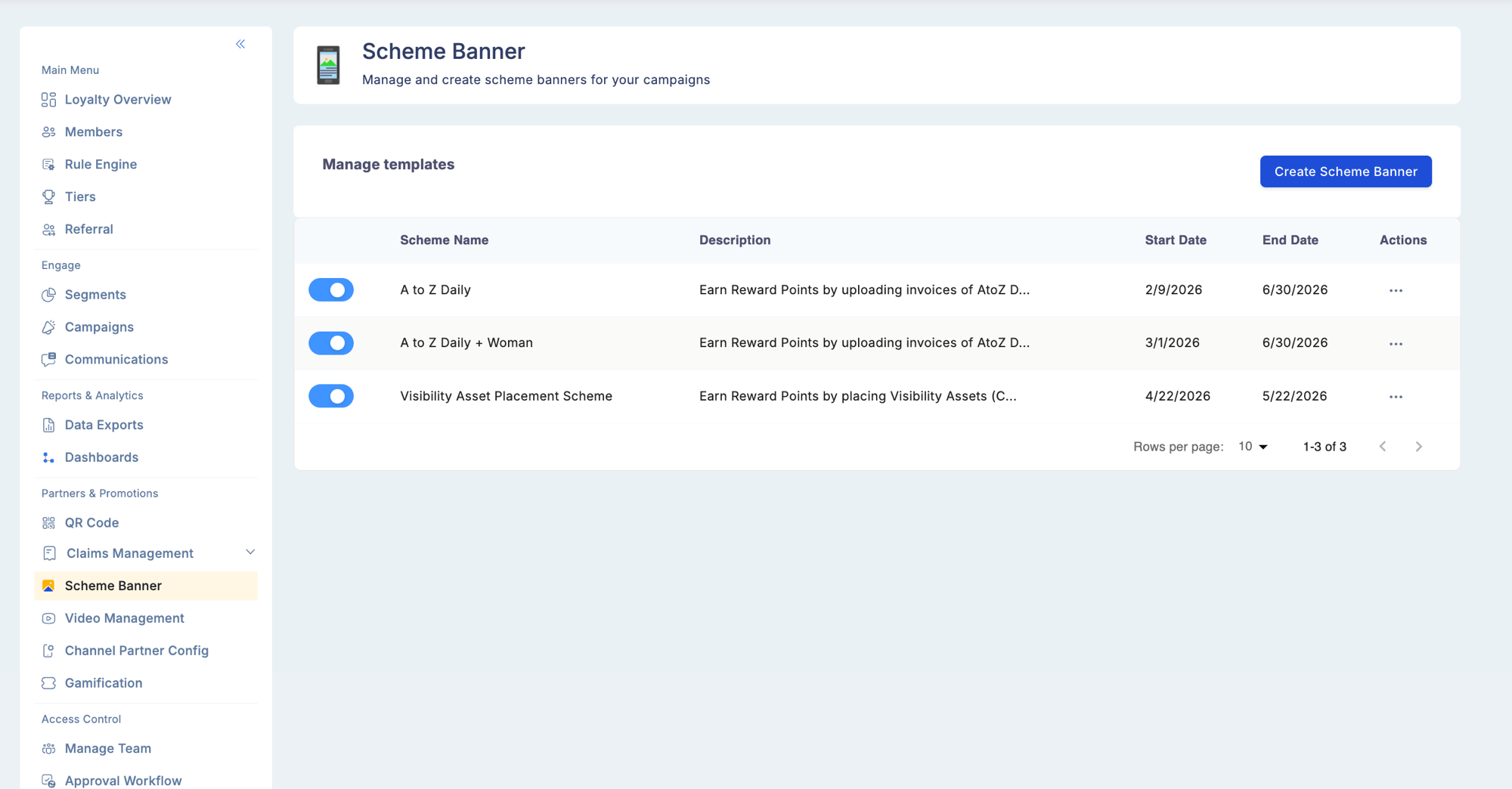
Go to **Partners & Promotions** > **Scheme Banner**. Select an existing scheme to edit or create a new one.
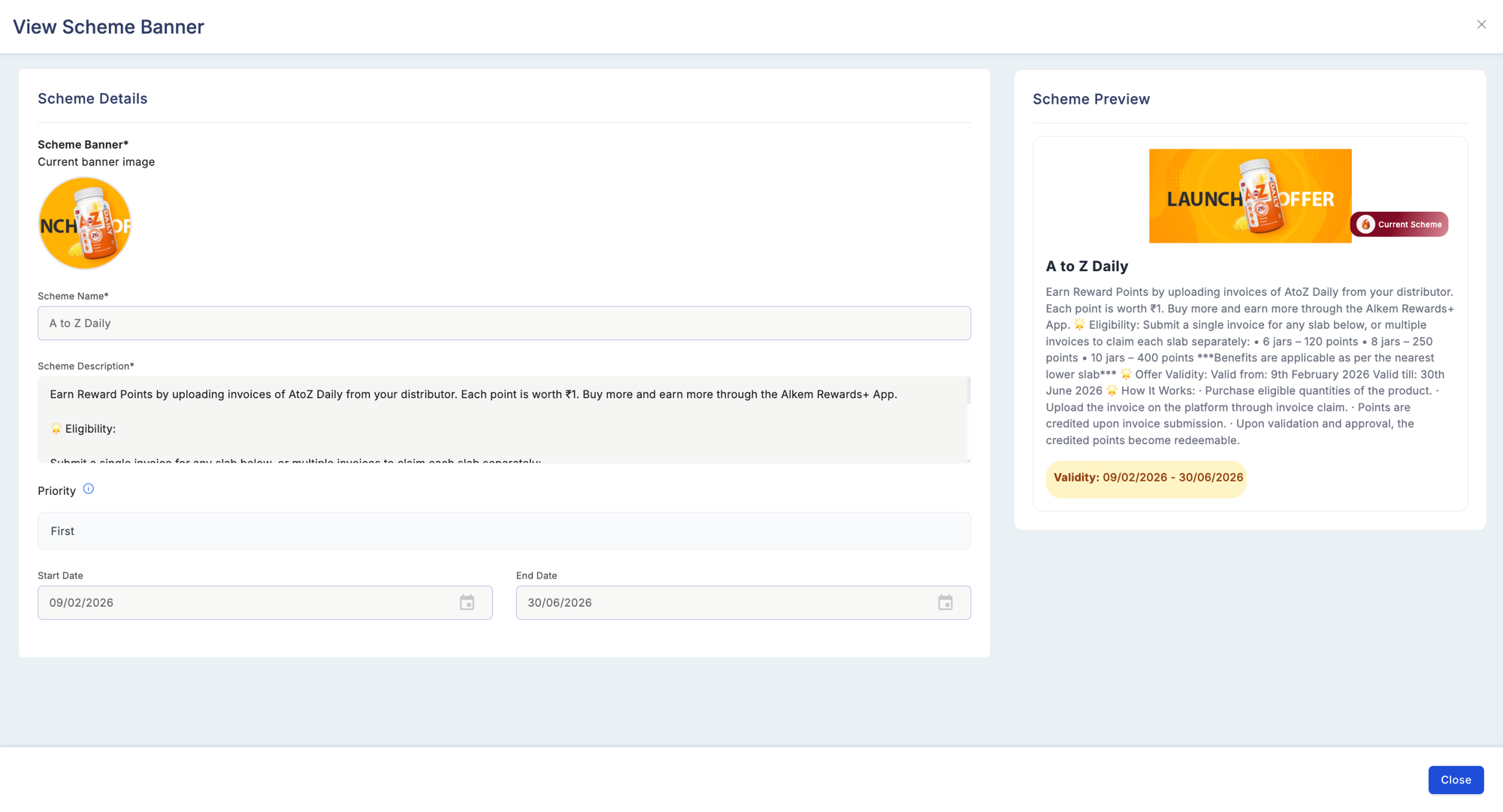
Enter a **Start Date** and an **End Date** for the promotion. Points accrue only on transactions that occur within this window (inclusive of both dates).
Add the SKU codes or product categories that qualify for this scheme. You can enter SKUs individually, select from the product catalog, or upload a list in bulk. Only transactions that include at least one eligible SKU will trigger the reward.
Enter the policy text for this scheme in the **Terms & Conditions** field. This is free text and is displayed to partners in the mobile app alongside the scheme details.
Save the scheme banner. It becomes active at the configured start date without any further manual steps.
## Configuring a scheme banner
Go to **Partners & Promotions** > **Scheme Banner**. Select an existing scheme to edit or create a new one.
Enter a **Start Date** and an **End Date** for the promotion. Points accrue only on transactions that occur within this window (inclusive of both dates).
Add the SKU codes or product categories that qualify for this scheme. You can enter SKUs individually, select from the product catalog, or upload a list in bulk. Only transactions that include at least one eligible SKU will trigger the reward.
Enter the policy text for this scheme in the **Terms & Conditions** field. This is free text and is displayed to partners in the mobile app alongside the scheme details.
Save the scheme banner. It becomes active at the configured start date without any further manual steps.
 ## Validity period
| Setting | Description |
| ---------------------- | -------------------------------------------------------------------------------------- |
| Start Date | The first date on which the scheme is active and points can be earned |
| End Date | The last date on which the scheme is active |
| Behaviour after expiry | The rule auto-deactivates when the end date passes; no manual intervention is required |
Common use cases for validity periods:
* Quarter-based distributor boosts (for example, July 1 to September 30)
* Seasonal or festival promotions
* Alignment with fiscal or promotional calendars
If you need to edit the start date after a scheme has already become active, contact your program administrator. Changing a start date retroactively may affect points already earned under the scheme.
## Eligible SKUs
| Setting | Description |
| ------------------ | ------------------------------------------------------------- |
| SKU Codes | Individual product identifiers that qualify for the reward |
| Product Categories | Broader groupings — all SKUs within the category are eligible |
| Bulk Upload | Upload a file containing multiple SKU codes at once |
| Catalog Selection | Pick eligible products directly from the product catalog |
Only transactions that include at least one eligible SKU trigger the rule. Transactions that contain only non-eligible SKUs do not earn points for this scheme, even if the partner and dates are valid.
Common use cases for SKU filters:
* Driving sell-through on newer or overstocked products
* Focusing rewards on premium or high-margin items
* Applying different reward rates per partner tier by creating separate schemes with different SKU lists
## Terms and conditions
The terms and conditions field accepts free text. Use it to communicate:
* Point reversal policy if a purchase is returned
* Geographic eligibility restrictions
* Non-combinability with other schemes or promotions
* Regional legal requirements or disclaimers
The text entered here is displayed to partners in the mobile app when they view the scheme details.
## Example campaign configuration
The following is an example of a complete scheme banner configuration.
| Setting | Value |
| ------------------------------------ | ------------------------------------------------------------------------------------------------------------------------------------------- |
| Scheme Name | August Premium Push |
| Start Date | August 1 |
| End Date | August 31 |
| Eligible SKUs | SKU#12345, SKU#12346 |
| Rule | Earn 15 points per unit sold |
| Partner Tier Filter (on Rule Engine) | Tier A only |
| Terms & Conditions | Points will be reversed if the invoiced product is returned within 30 days. This scheme cannot be combined with any other active promotion. |
Result: a Tier A channel partner who sells one unit of SKU#12345 on August 15 earns 15 points. The same partner selling a non-eligible SKU on the same date earns nothing under this scheme (other rules may still apply).
Scheme Banner configuration requires the **Manage Scheme Banners** permission.
## Validity period
| Setting | Description |
| ---------------------- | -------------------------------------------------------------------------------------- |
| Start Date | The first date on which the scheme is active and points can be earned |
| End Date | The last date on which the scheme is active |
| Behaviour after expiry | The rule auto-deactivates when the end date passes; no manual intervention is required |
Common use cases for validity periods:
* Quarter-based distributor boosts (for example, July 1 to September 30)
* Seasonal or festival promotions
* Alignment with fiscal or promotional calendars
If you need to edit the start date after a scheme has already become active, contact your program administrator. Changing a start date retroactively may affect points already earned under the scheme.
## Eligible SKUs
| Setting | Description |
| ------------------ | ------------------------------------------------------------- |
| SKU Codes | Individual product identifiers that qualify for the reward |
| Product Categories | Broader groupings — all SKUs within the category are eligible |
| Bulk Upload | Upload a file containing multiple SKU codes at once |
| Catalog Selection | Pick eligible products directly from the product catalog |
Only transactions that include at least one eligible SKU trigger the rule. Transactions that contain only non-eligible SKUs do not earn points for this scheme, even if the partner and dates are valid.
Common use cases for SKU filters:
* Driving sell-through on newer or overstocked products
* Focusing rewards on premium or high-margin items
* Applying different reward rates per partner tier by creating separate schemes with different SKU lists
## Terms and conditions
The terms and conditions field accepts free text. Use it to communicate:
* Point reversal policy if a purchase is returned
* Geographic eligibility restrictions
* Non-combinability with other schemes or promotions
* Regional legal requirements or disclaimers
The text entered here is displayed to partners in the mobile app when they view the scheme details.
## Example campaign configuration
The following is an example of a complete scheme banner configuration.
| Setting | Value |
| ------------------------------------ | ------------------------------------------------------------------------------------------------------------------------------------------- |
| Scheme Name | August Premium Push |
| Start Date | August 1 |
| End Date | August 31 |
| Eligible SKUs | SKU#12345, SKU#12346 |
| Rule | Earn 15 points per unit sold |
| Partner Tier Filter (on Rule Engine) | Tier A only |
| Terms & Conditions | Points will be reversed if the invoiced product is returned within 30 days. This scheme cannot be combined with any other active promotion. |
Result: a Tier A channel partner who sells one unit of SKU#12345 on August 15 earns 15 points. The same partner selling a non-eligible SKU on the same date earns nothing under this scheme (other rules may still apply).
Scheme Banner configuration requires the **Manage Scheme Banners** permission.