> ## Documentation Index
> Fetch the complete documentation index at: https://help-loyalife.xoxoday.com/llms.txt
> Use this file to discover all available pages before exploring further.
# Referral setup
> Enable the referral program, configure code generation, define reward triggers, and set point allocations and caps.
Setting up the referral program takes five steps: enable the module, verify the auto-created attributes, configure code generation, define when rewards are issued, and set point amounts and caps.
## Step 1: Enable the referral program
Navigate to **Referral** in the left sidebar and click **Enable Referral Program**. You will be prompted to confirm before the module is activated.
## Step 2: Auto-created member attributes
When you enable referrals, Loyalife automatically creates two member attributes. These appear on every member profile and are available in reports and rule conditions:
| Attribute | Purpose |
| ----------------- | ------------------------------------------------------------------------- |
| **Referral Code** | A unique code assigned to each member — shared with others to invite them |
| **Referred By** | Records which member's referral code was used when this member enrolled |
These attributes are system-managed. You cannot manually edit their values through the admin portal, though they can be set via API during bulk member imports.
## Step 3: Configure code generation
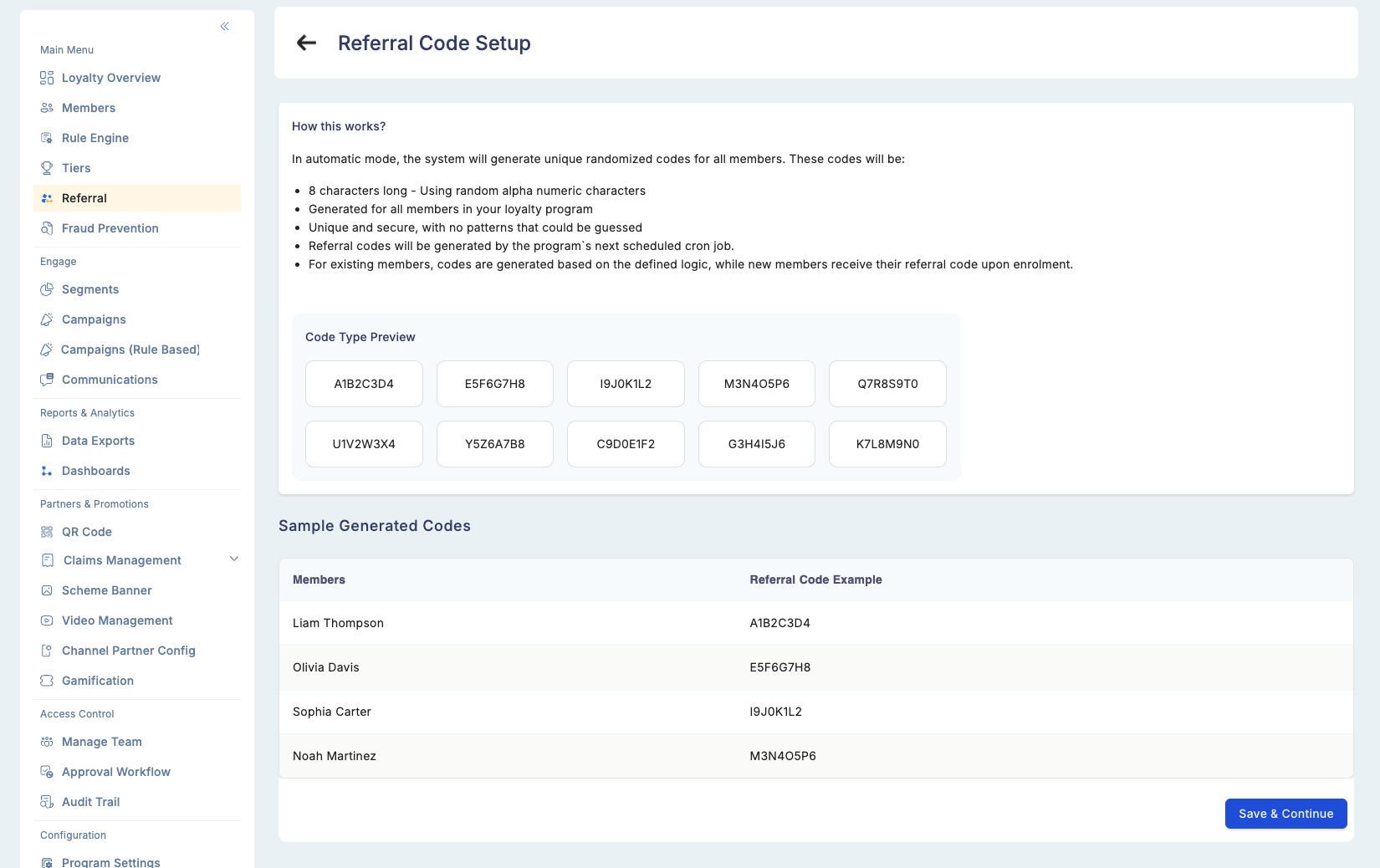
Choose how referral codes are generated for your member base.
### Auto-generate (recommended)
Loyalife generates an 8-character uppercase alphanumeric code for each member (e.g., `X3FJ92B7`). Codes are:
* Unique across all members
* Immutable — cannot be changed after generation
* Automatically assigned to new members on enrollment (when **Auto-generate for new enrollments** is enabled)
**Bulk generation:** Use the **Bulk Generate** option to create codes for all existing members who do not yet have one. This is typically a one-time action at program launch.
### External code management
If your platform manages referral codes independently, disable Loyalife's code generation. Supply custom codes via API or file upload instead. The `Referral Code` attribute is available as a field in the member import file.
 ## Step 4: Configure the deep link (AppsFlyer OneLink)
If your mobile app uses **AppsFlyer OneLink** for deep linking, configure the OneLink template URL in the referral settings. This enables:
* Device-aware redirects (iOS App Store vs. Google Play Store)
* Direct app open with referral context if the app is already installed
* Correct attribution of installs to the referring member
Contact your Loyalife implementation team to connect AppsFlyer OneLink to your referral program.
## Step 5: Set the reward trigger
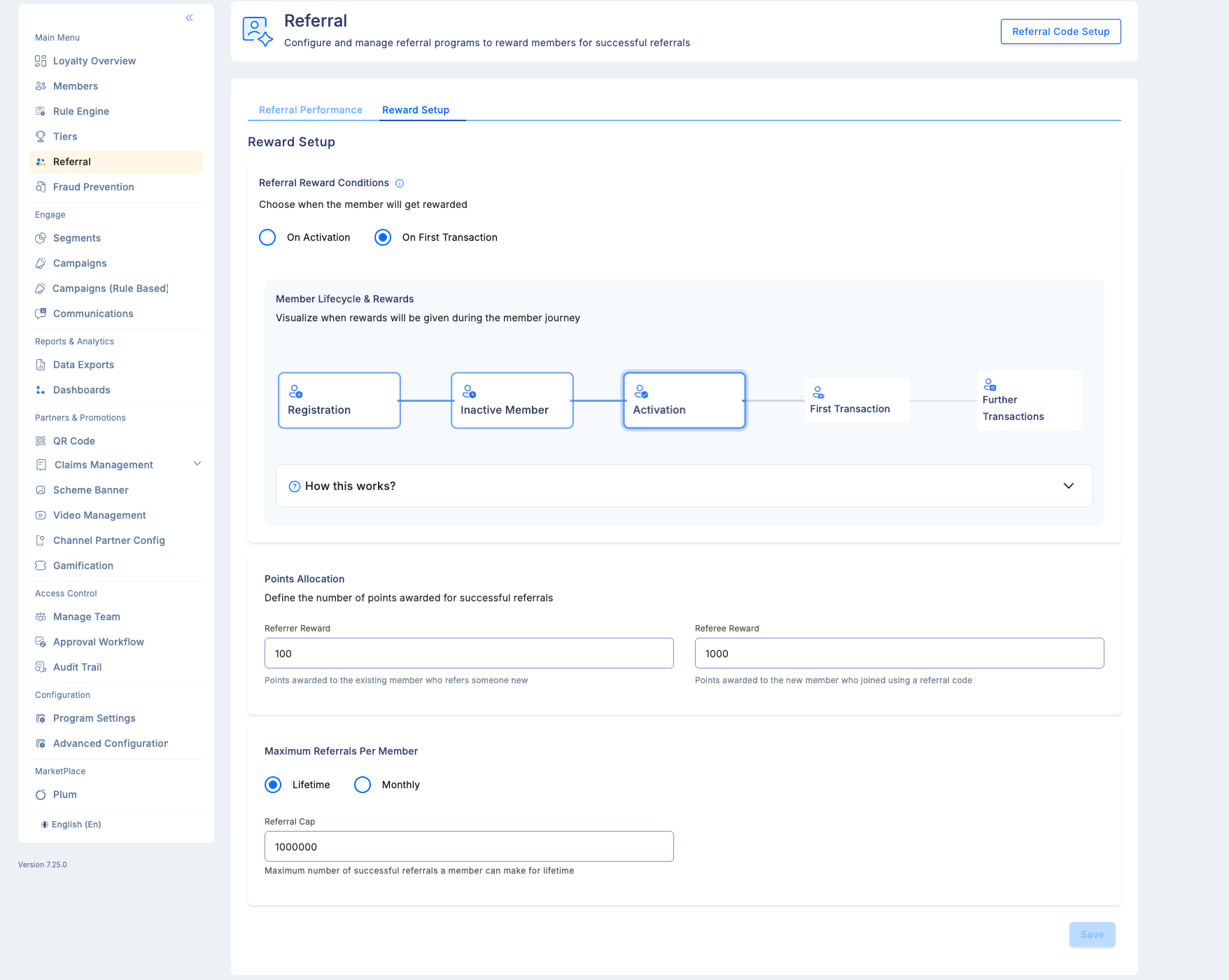
Define when rewards are distributed to both the referrer and the new member:
| Trigger | When rewards are issued |
| --------------------- | -------------------------------------------------------------------------------------------------------------------------------------------- |
| **Activation** | The referrer earns points as soon as the referred member activates their account — no transaction required |
| **First transaction** | Rewards are held until the referred member completes their first qualifying transaction — both parties receive their reward at the same time |
"First transaction" is the more common trigger because it ensures the referred member is genuinely engaged before rewards are paid out, reducing the risk of fraudulent or low-quality acquisitions.
## Step 4: Configure the deep link (AppsFlyer OneLink)
If your mobile app uses **AppsFlyer OneLink** for deep linking, configure the OneLink template URL in the referral settings. This enables:
* Device-aware redirects (iOS App Store vs. Google Play Store)
* Direct app open with referral context if the app is already installed
* Correct attribution of installs to the referring member
Contact your Loyalife implementation team to connect AppsFlyer OneLink to your referral program.
## Step 5: Set the reward trigger
Define when rewards are distributed to both the referrer and the new member:
| Trigger | When rewards are issued |
| --------------------- | -------------------------------------------------------------------------------------------------------------------------------------------- |
| **Activation** | The referrer earns points as soon as the referred member activates their account — no transaction required |
| **First transaction** | Rewards are held until the referred member completes their first qualifying transaction — both parties receive their reward at the same time |
"First transaction" is the more common trigger because it ensures the referred member is genuinely engaged before rewards are paid out, reducing the risk of fraudulent or low-quality acquisitions.
 ## Step 6: Define point allocations
Set the reward amounts for each party:
| Field | Required | Description |
| --------------- | -------- | --------------------------------------------------------- |
| Referrer reward | Yes | Points awarded to the member who shared the code |
| Referee reward | Optional | Welcome bonus points awarded to the newly referred member |
Setting a referee reward (welcome bonus) increases the new member's motivation to use the referral code and complete the trigger action.
## Step 7: Set a referral cap
Limit how many successful referrals a single member can earn rewards for. This prevents a small group of power users from dominating your referral budget:
| Setting | Options |
| ------------- | ------------------------------------------------------------ |
| Cap timeframe | Monthly or Lifetime |
| Cap limit | Maximum number of qualifying referrals per member per period |
Once a member reaches their cap, any additional referrals they generate will not award them points (though the new member's welcome bonus, if configured, is still issued).
## Fraud controls
These rules are enforced automatically and cannot be disabled:
| Rule | Behavior |
| -------------------------- | ----------------------------------------------------------- |
| No self-referrals | A member cannot use their own referral code |
| No double referrals | The same person cannot be referred by two different members |
| One-time reward per friend | Each referred friend triggers a referrer reward only once |
## Audit trail
All changes to referral configuration — point amounts, triggers, cap settings, and code generation settings — are logged in the Audit Trail with a timestamp and actor. This ensures accountability when multiple managers have access to the referral module.
## Step 6: Define point allocations
Set the reward amounts for each party:
| Field | Required | Description |
| --------------- | -------- | --------------------------------------------------------- |
| Referrer reward | Yes | Points awarded to the member who shared the code |
| Referee reward | Optional | Welcome bonus points awarded to the newly referred member |
Setting a referee reward (welcome bonus) increases the new member's motivation to use the referral code and complete the trigger action.
## Step 7: Set a referral cap
Limit how many successful referrals a single member can earn rewards for. This prevents a small group of power users from dominating your referral budget:
| Setting | Options |
| ------------- | ------------------------------------------------------------ |
| Cap timeframe | Monthly or Lifetime |
| Cap limit | Maximum number of qualifying referrals per member per period |
Once a member reaches their cap, any additional referrals they generate will not award them points (though the new member's welcome bonus, if configured, is still issued).
## Fraud controls
These rules are enforced automatically and cannot be disabled:
| Rule | Behavior |
| -------------------------- | ----------------------------------------------------------- |
| No self-referrals | A member cannot use their own referral code |
| No double referrals | The same person cannot be referred by two different members |
| One-time reward per friend | Each referred friend triggers a referrer reward only once |
## Audit trail
All changes to referral configuration — point amounts, triggers, cap settings, and code generation settings — are logged in the Audit Trail with a timestamp and actor. This ensures accountability when multiple managers have access to the referral module.