> ## Documentation Index
> Fetch the complete documentation index at: https://help-loyalife.xoxoday.com/llms.txt
> Use this file to discover all available pages before exploring further.
# Rule Engine overview
> Explore how Loyalife's Rule Engine builds no-code earning rules using IF/THEN conditions, attributes, restrictions, and reward types.
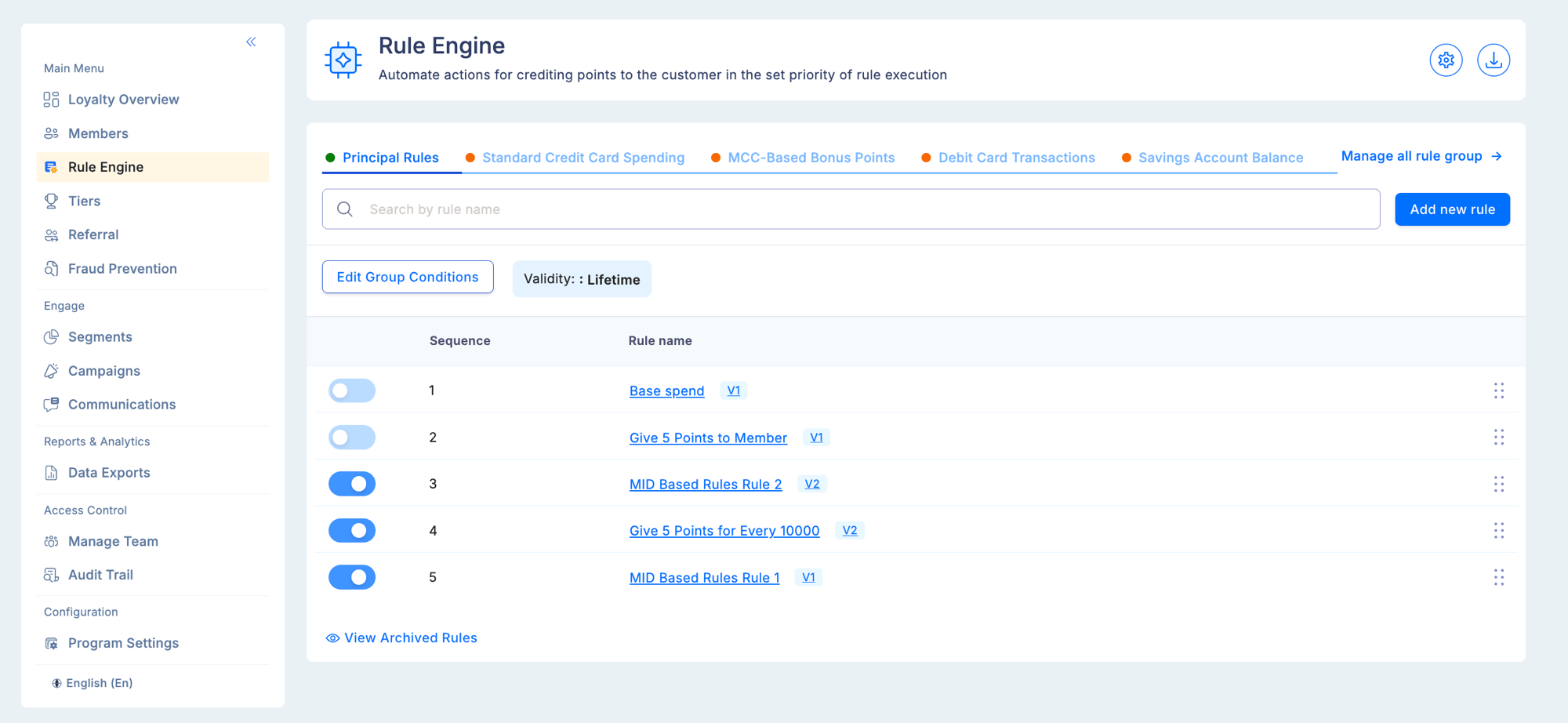
The Rule Engine is the core of your loyalty program's incentive structure. It lets you create conditions-based rules — "if a transaction meets these criteria, apply this reward" — without any code. Rules support simple flat-rate earning, tiered multipliers, milestone bonuses, birthday cashback, and time-targeted promotions.
## How it works
When a transaction arrives (via API or file upload), Loyalife evaluates all active rule groups whose linked segment includes the transacting member. Matching rules determine how many points, what cashback percentage, or what bonus applies. Results are posted to the member's account immediately.
**Example — retail loyalty program:**
* Earn 2 points per ₹1 spent at any time
* Earn an additional 1% cashback on transactions above ₹5,000
* Earn 500 bonus points on the member's birthday month
* Earn a 25% cashback on every 20th order in a calendar month
Each is a separate rule inside the same rule group. All evaluate simultaneously for each transaction.
 ## Core components
Data variables that carry information about transactions and members. Attributes are the inputs that rules evaluate.
Named containers that hold related rules. Can be linked to a specific segment so rules only apply to a targeted audience.
IF/THEN logic statements: if conditions are met, award the defined reward. Each rule has conditions, a reward type, and optional limits.
## Building an earning rule
### IF conditions
Each condition has three parts:
| Part | Description |
| ------------- | ------------------------------------------------------------------------- |
| **Attribute** | The data point to check (e.g., Transaction Amount, MCC, Transaction Date) |
| **Operator** | How to compare (equals, greater than, contains, between, is multiple of) |
| **Value** | A static threshold, or another member attribute for dynamic comparisons |
Multiple conditions combine with **AND** (all must be true) or **OR** (any must be true).
Every rule condition evaluates a **combination of transaction attributes and member attributes** — what happened in the transaction, and who the member is. This is what makes the Rule Engine powerful: a single rule can simultaneously check "was the transaction amount above ₹5,000?" (transaction attribute) and "is the member in the Gold tier?" (member attribute) and "has the member transacted more than 10 times this month?" (aggregate attribute).
**Supported attribute categories:**
| Category | Source | Examples |
| --------------------------------- | --------------------------------------------------- | -------------------------------------------------------------------------------------------------------------------------- |
| **Transaction attributes** | Submitted with each transaction via API or TXN file | Transaction Amount, Transaction Date, Product Code, Sub Product Code, Transaction Type, Relation Reference, Transaction Id |
| **Custom transaction attributes** | Defined by you in Rule Engine → Attributes | Merchant Name, MCC Code, Channel, Store ID, any program-specific transaction field |
| **Member (global) attributes** | Built-in member profile fields | Date of Birth, Gender, Status, Preferred Language |
| **Member (custom) attributes** | Defined by you in Members → Attributes | Occupation, region, card type, any program-specific member field |
| **Aggregate attributes** | Computed from transaction history | Monthly Spend Sum, Transaction Count (MTD/YTD), Average Transaction Value |
### Operators
| Operator | Applies to | Description |
| ------------------------ | -------------- | ----------------------------------------------------- |
| Equals / Not Equals | All types | Exact match or exclusion |
| Greater Than / Less Than | Numbers, Dates | Threshold comparison |
| Between | Numbers, Dates | Inclusive range check |
| Contains | Text | Substring match (e.g., merchant name contains "Fuel") |
| **Is Multiple Of** | Numbers | Matches every Nth value — used for milestone rewards |
### Date and time conditions
The Transaction Date attribute supports **combined date and time** values. The date picker opens with a calendar plus an embedded time selector (HH:MM, 24-hour format) below the grid.
| Picker element | Behavior |
| --------------------- | -------------------------------------------------- |
| Calendar | Select the date as usual |
| Time selector (HH:MM) | Hour range 00–23, minute range 00–59 |
| Default time | 00:00 (midnight) |
| Today button | Sets current date + current time |
| Apply button | Confirms and closes the picker |
| Combined display | Shows as `MM/DD/YYYY HH:MM` in the condition field |
For the **between** operator, both start and end pickers include their own time selectors. Existing rules with date-only values continue to work as-is — they are treated as 00:00 by default.
**Example use cases:**
| Rule condition | Value entered | Meaning |
| ------------------------ | ----------------------------------- | ---------------------------------------- |
| Transaction Date > | 04/22/2026 18:00 | Only transactions after 6 PM on April 22 |
| Transaction Date between | 04/01/2026 00:00 → 04/30/2026 23:59 | All of April |
| Transaction Date = | 04/22/2026 14:30 | Exactly at 2:30 PM on April 22 |
### Dynamic attribute comparisons — birthday and anniversary rules
Instead of comparing an attribute to a fixed value, you can compare it to another **member attribute**. This enables rules like birthday cashback or card anniversary bonuses.
**Birthday cashback example:**
```
Condition 1: Transaction Date [Date of Month] Equals Date of Birth [Date of Month]
Condition 2: Transaction Date [Month of Year] Equals Date of Birth [Month of Year]
THEN: 35% cashback
```
**Constraints for dynamic comparisons:**
| Constraint | Rule |
| --------------------- | ---------------------------------------------------------------------------------------- |
| No self-comparison | An attribute cannot compare to itself |
| Type compatibility | Left and right must be the same data type (Date ↔ Date, Number ↔ Number) |
| Date type lock | If the left side uses `[Date of Month]`, the right side auto-locks to `[Date of Month]` |
| Operator restrictions | `Contains` and `Is Multiple Of` are not available for attribute-to-attribute comparisons |
**Edge cases for birthday rules:**
| Scenario | Behavior |
| ----------------------------------------------------- | ------------------------------------------------------- |
| Date of Birth not set in member profile | Condition evaluates to false — no birthday reward |
| Member born on Feb 29 | No birthday reward in non-leap years |
| Profile DOB updated mid-month (reward already issued) | Next reward on the new date, following year |
| Supplementary card transaction | Uses the DOB of the primary account linked to that card |
### Milestone rewards (Is Multiple Of)
The **Is Multiple Of** operator fires a rule every time an aggregate count or sum hits a multiple of your configured value. The current transaction is included in the aggregate before evaluation. Reversals and refunds adjust the aggregate automatically.
**Example — reward every 20th order per month:**
```
Attribute: Monthly Order Count
Operator: Is Multiple Of
Value: 20
Reward: 25% cashback (capped at ₹500 per transaction)
```
This fires on the 20th, 40th, 60th order, and so on.
An implicit `Count > 0` guard is added automatically when you use **Is Multiple Of** to prevent zero from incorrectly matching (since 0 is technically a multiple of any number).
### THEN reward
| Reward type | Internal name | Description |
| --------------- | :--------------: | ----------------------------------------------------------------------------------------------------------- |
| **Flat Points** | `flat` | A fixed number of points regardless of transaction amount |
| **Multiplier** | `mutiple` | Multiplies the transaction amount (or base earning) by the configured factor to calculate points |
| **For Every** | `attributeValue` | Awards a fixed number of points for every N units of an attribute value (e.g., 1 point for every ₹10 spent) |
**Value type for the THEN condition:**
| Value type | Description |
| ------------------- | -------------------------------------------------------------------------------- |
| **Static value** | A fixed number configured in the rule |
| **Match attribute** | The value is drawn from a member attribute at the time of transaction evaluation |
### Restrictions
Each earning rule can carry one or more restrictions that limit *when* and *how much* the rule fires. Add restrictions from the **Restrictions** section of the rule builder.
| Restriction type | What it does |
| ------------------------------- | ------------------------------------------------------------------------------------------------------------- |
| **Point Limit (MaximumPoints)** | Sets a hard cap on the maximum points a single transaction can earn from this rule |
| **Date Range** | Restricts the rule to only fire within a specific start–end date window |
| **Calculation Timing** | Controls when points are posted after a qualifying transaction (e.g., immediately vs. after a holding period) |
| **Product Codes** | Restricts the rule to only fire for transactions with specific product codes |
| **Sub Product Codes** | Further narrows to specific sub-product codes within a product category |
**Combining restrictions:**
Multiple restrictions are evaluated together with AND logic — a transaction must satisfy all active restrictions for the rule to fire. For example, a rule restricted to a date range AND specific product codes will only fire for qualifying products within that time window.
Restrictions layer on top of IF conditions, not instead of them. A transaction must first pass all IF conditions, then pass all active restrictions, before the THEN reward is applied.
### Limits and caps
| Level | Limit type | Description |
| ----- | --------------- | ------------------------------------------ |
| Rule | Per transaction | Maximum earning per single transaction |
| Rule | Velocity | Maximum qualifying transactions per period |
| Group | Daily | Maximum group earning per member per day |
| Group | Monthly | Maximum group earning per member per month |
| Group | Lifetime | Maximum group earning per member ever |
## Activating and deactivating rules
Changes to rule status (active/inactive) take effect immediately for new transactions. They do not retroactively apply or reverse points already awarded.
## Troubleshooting
**A rule is not firing on expected transactions.**
* Confirm the rule group is set to Active.
* Check whether the group has a linked segment — the transacting member must be in that segment.
* Review all condition operators and values carefully, especially date formats and time values.
* Check whether a group-level cap for this member has already been reached.
**A member is earning on transactions that should be excluded.**
* Identify all active rule groups with no segment restriction — they apply to every member.
* Look for overlapping conditions that inadvertently match.
**Birthday rule is not firing.**
* Confirm the member's Date of Birth is populated in their profile.
* Members born on February 29 receive no birthday reward in non-leap years.
* If the DOB was updated mid-month after the reward was already issued, the new date takes effect the following year.
## Core components
Data variables that carry information about transactions and members. Attributes are the inputs that rules evaluate.
Named containers that hold related rules. Can be linked to a specific segment so rules only apply to a targeted audience.
IF/THEN logic statements: if conditions are met, award the defined reward. Each rule has conditions, a reward type, and optional limits.
## Building an earning rule
### IF conditions
Each condition has three parts:
| Part | Description |
| ------------- | ------------------------------------------------------------------------- |
| **Attribute** | The data point to check (e.g., Transaction Amount, MCC, Transaction Date) |
| **Operator** | How to compare (equals, greater than, contains, between, is multiple of) |
| **Value** | A static threshold, or another member attribute for dynamic comparisons |
Multiple conditions combine with **AND** (all must be true) or **OR** (any must be true).
Every rule condition evaluates a **combination of transaction attributes and member attributes** — what happened in the transaction, and who the member is. This is what makes the Rule Engine powerful: a single rule can simultaneously check "was the transaction amount above ₹5,000?" (transaction attribute) and "is the member in the Gold tier?" (member attribute) and "has the member transacted more than 10 times this month?" (aggregate attribute).
**Supported attribute categories:**
| Category | Source | Examples |
| --------------------------------- | --------------------------------------------------- | -------------------------------------------------------------------------------------------------------------------------- |
| **Transaction attributes** | Submitted with each transaction via API or TXN file | Transaction Amount, Transaction Date, Product Code, Sub Product Code, Transaction Type, Relation Reference, Transaction Id |
| **Custom transaction attributes** | Defined by you in Rule Engine → Attributes | Merchant Name, MCC Code, Channel, Store ID, any program-specific transaction field |
| **Member (global) attributes** | Built-in member profile fields | Date of Birth, Gender, Status, Preferred Language |
| **Member (custom) attributes** | Defined by you in Members → Attributes | Occupation, region, card type, any program-specific member field |
| **Aggregate attributes** | Computed from transaction history | Monthly Spend Sum, Transaction Count (MTD/YTD), Average Transaction Value |
### Operators
| Operator | Applies to | Description |
| ------------------------ | -------------- | ----------------------------------------------------- |
| Equals / Not Equals | All types | Exact match or exclusion |
| Greater Than / Less Than | Numbers, Dates | Threshold comparison |
| Between | Numbers, Dates | Inclusive range check |
| Contains | Text | Substring match (e.g., merchant name contains "Fuel") |
| **Is Multiple Of** | Numbers | Matches every Nth value — used for milestone rewards |
### Date and time conditions
The Transaction Date attribute supports **combined date and time** values. The date picker opens with a calendar plus an embedded time selector (HH:MM, 24-hour format) below the grid.
| Picker element | Behavior |
| --------------------- | -------------------------------------------------- |
| Calendar | Select the date as usual |
| Time selector (HH:MM) | Hour range 00–23, minute range 00–59 |
| Default time | 00:00 (midnight) |
| Today button | Sets current date + current time |
| Apply button | Confirms and closes the picker |
| Combined display | Shows as `MM/DD/YYYY HH:MM` in the condition field |
For the **between** operator, both start and end pickers include their own time selectors. Existing rules with date-only values continue to work as-is — they are treated as 00:00 by default.
**Example use cases:**
| Rule condition | Value entered | Meaning |
| ------------------------ | ----------------------------------- | ---------------------------------------- |
| Transaction Date > | 04/22/2026 18:00 | Only transactions after 6 PM on April 22 |
| Transaction Date between | 04/01/2026 00:00 → 04/30/2026 23:59 | All of April |
| Transaction Date = | 04/22/2026 14:30 | Exactly at 2:30 PM on April 22 |
### Dynamic attribute comparisons — birthday and anniversary rules
Instead of comparing an attribute to a fixed value, you can compare it to another **member attribute**. This enables rules like birthday cashback or card anniversary bonuses.
**Birthday cashback example:**
```
Condition 1: Transaction Date [Date of Month] Equals Date of Birth [Date of Month]
Condition 2: Transaction Date [Month of Year] Equals Date of Birth [Month of Year]
THEN: 35% cashback
```
**Constraints for dynamic comparisons:**
| Constraint | Rule |
| --------------------- | ---------------------------------------------------------------------------------------- |
| No self-comparison | An attribute cannot compare to itself |
| Type compatibility | Left and right must be the same data type (Date ↔ Date, Number ↔ Number) |
| Date type lock | If the left side uses `[Date of Month]`, the right side auto-locks to `[Date of Month]` |
| Operator restrictions | `Contains` and `Is Multiple Of` are not available for attribute-to-attribute comparisons |
**Edge cases for birthday rules:**
| Scenario | Behavior |
| ----------------------------------------------------- | ------------------------------------------------------- |
| Date of Birth not set in member profile | Condition evaluates to false — no birthday reward |
| Member born on Feb 29 | No birthday reward in non-leap years |
| Profile DOB updated mid-month (reward already issued) | Next reward on the new date, following year |
| Supplementary card transaction | Uses the DOB of the primary account linked to that card |
### Milestone rewards (Is Multiple Of)
The **Is Multiple Of** operator fires a rule every time an aggregate count or sum hits a multiple of your configured value. The current transaction is included in the aggregate before evaluation. Reversals and refunds adjust the aggregate automatically.
**Example — reward every 20th order per month:**
```
Attribute: Monthly Order Count
Operator: Is Multiple Of
Value: 20
Reward: 25% cashback (capped at ₹500 per transaction)
```
This fires on the 20th, 40th, 60th order, and so on.
An implicit `Count > 0` guard is added automatically when you use **Is Multiple Of** to prevent zero from incorrectly matching (since 0 is technically a multiple of any number).
### THEN reward
| Reward type | Internal name | Description |
| --------------- | :--------------: | ----------------------------------------------------------------------------------------------------------- |
| **Flat Points** | `flat` | A fixed number of points regardless of transaction amount |
| **Multiplier** | `mutiple` | Multiplies the transaction amount (or base earning) by the configured factor to calculate points |
| **For Every** | `attributeValue` | Awards a fixed number of points for every N units of an attribute value (e.g., 1 point for every ₹10 spent) |
**Value type for the THEN condition:**
| Value type | Description |
| ------------------- | -------------------------------------------------------------------------------- |
| **Static value** | A fixed number configured in the rule |
| **Match attribute** | The value is drawn from a member attribute at the time of transaction evaluation |
### Restrictions
Each earning rule can carry one or more restrictions that limit *when* and *how much* the rule fires. Add restrictions from the **Restrictions** section of the rule builder.
| Restriction type | What it does |
| ------------------------------- | ------------------------------------------------------------------------------------------------------------- |
| **Point Limit (MaximumPoints)** | Sets a hard cap on the maximum points a single transaction can earn from this rule |
| **Date Range** | Restricts the rule to only fire within a specific start–end date window |
| **Calculation Timing** | Controls when points are posted after a qualifying transaction (e.g., immediately vs. after a holding period) |
| **Product Codes** | Restricts the rule to only fire for transactions with specific product codes |
| **Sub Product Codes** | Further narrows to specific sub-product codes within a product category |
**Combining restrictions:**
Multiple restrictions are evaluated together with AND logic — a transaction must satisfy all active restrictions for the rule to fire. For example, a rule restricted to a date range AND specific product codes will only fire for qualifying products within that time window.
Restrictions layer on top of IF conditions, not instead of them. A transaction must first pass all IF conditions, then pass all active restrictions, before the THEN reward is applied.
### Limits and caps
| Level | Limit type | Description |
| ----- | --------------- | ------------------------------------------ |
| Rule | Per transaction | Maximum earning per single transaction |
| Rule | Velocity | Maximum qualifying transactions per period |
| Group | Daily | Maximum group earning per member per day |
| Group | Monthly | Maximum group earning per member per month |
| Group | Lifetime | Maximum group earning per member ever |
## Activating and deactivating rules
Changes to rule status (active/inactive) take effect immediately for new transactions. They do not retroactively apply or reverse points already awarded.
## Troubleshooting
**A rule is not firing on expected transactions.**
* Confirm the rule group is set to Active.
* Check whether the group has a linked segment — the transacting member must be in that segment.
* Review all condition operators and values carefully, especially date formats and time values.
* Check whether a group-level cap for this member has already been reached.
**A member is earning on transactions that should be excluded.**
* Identify all active rule groups with no segment restriction — they apply to every member.
* Look for overlapping conditions that inadvertently match.
**Birthday rule is not firing.**
* Confirm the member's Date of Birth is populated in their profile.
* Members born on February 29 receive no birthday reward in non-leap years.
* If the DOB was updated mid-month after the reward was already issued, the new date takes effect the following year.