> ## Documentation Index
> Fetch the complete documentation index at: https://help-loyalife.xoxoday.com/llms.txt
> Use this file to discover all available pages before exploring further.
# Rule groups
> Learn how rule groups control which members earning rules apply to, set earning caps, and organize campaigns in Loyalife's Rule Engine.
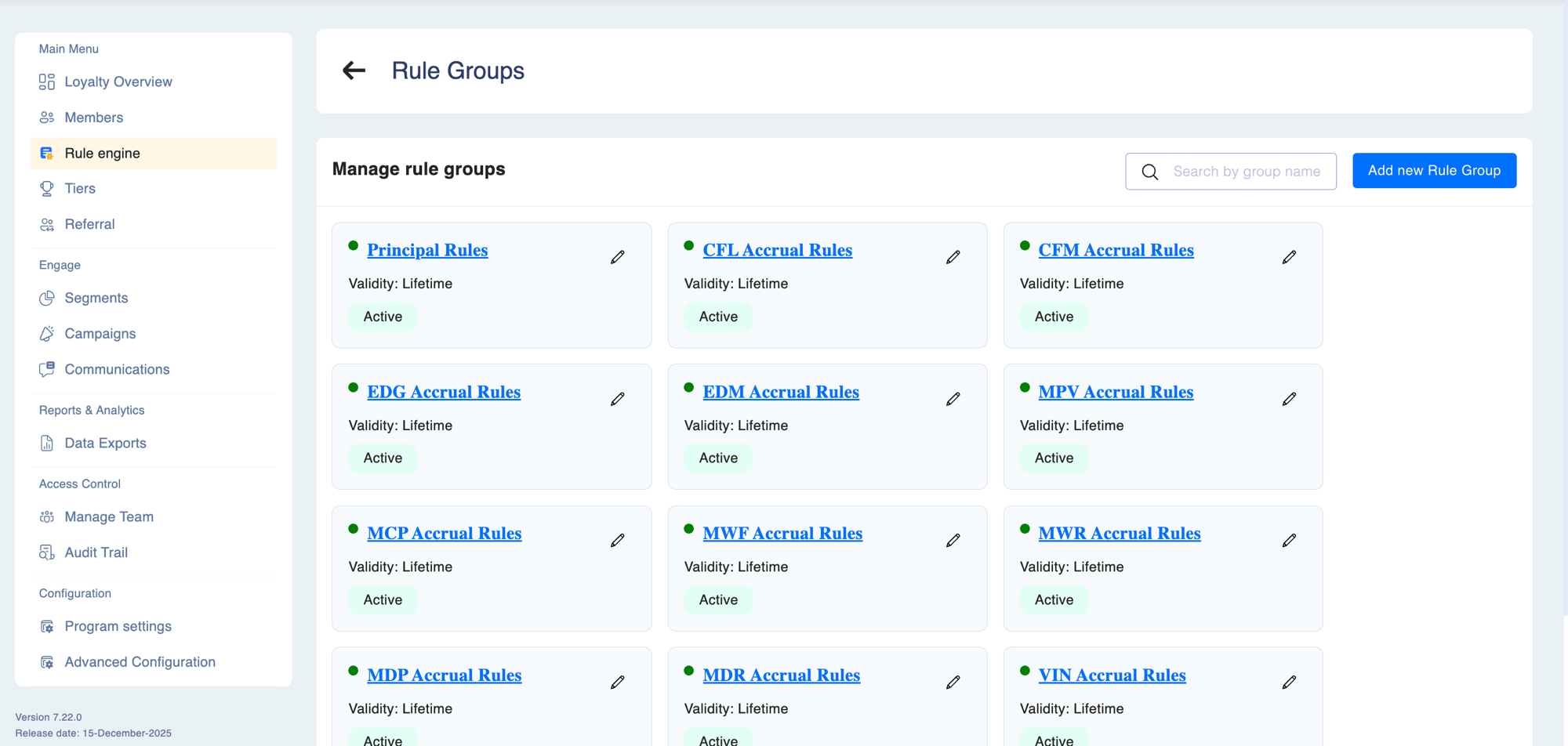
Rule groups are the **organisational backbone of the Rule Engine**. They are not just folders — they are the mechanism that determines *which members* a set of rules applies to and *how much* those members can earn in aggregate. Every earning rule must belong to a rule group.
 ## Why rule groups matter
Without rule groups, all rules would apply to every member in the program. Rule groups solve three problems that a flat rule list cannot:
| Problem | How rule groups solve it |
| --------------------------------------------------- | ---------------------------------------------------------------------------------------------------------------------------------- |
| **Different earning rates for different audiences** | Link a rule group to a segment — only members in that segment earn from those rules |
| **Preventing over-earning across multiple rules** | Group-level caps limit total earning per member across all rules in the group, per day, month, or lifetime |
| **Organising complexity** | Separate rule groups for base earning, promotions, partner schemes, and seasonal offers — each independently managed and togglable |
## How rule group evaluation works
When a transaction arrives, Loyalife:
1. Identifies all **active** rule groups
2. For each group with a linked segment, checks whether the transacting member is in that segment
3. Evaluates every rule inside each qualifying group
4. Awards rewards from all matching rules across all qualifying groups **simultaneously**
A member can earn from multiple rule groups in a single transaction. For example, a Gold tier member can earn base points from an "All Members" group and a tier bonus from a "Gold Members" group at the same time — as long as both groups are active and the member is in each group's segment.
## Rule group properties
| Property | Description |
| ------------------ | ----------------------------------------------------------------------------------------- |
| **Name** | Internal label shown in reports, audit logs, and the maker-checker queue |
| **Description** | Optional explanation of the group's purpose |
| **Linked Segment** | If set, rules only apply to members in this segment. Leave unset to apply to all members. |
| **Point Limit** | Maximum points a member can earn from this group per transaction |
| **Daily Cap** | Maximum points per member per day across all rules in this group |
| **Monthly Cap** | Maximum points per member per calendar month |
| **Lifetime Cap** | Maximum points per member ever — once reached, no further earning from this group |
| **Status** | Active or Inactive — toggling pauses all rules in the group instantly |
Group-level caps are distinct from rule-level caps. A rule-level cap limits earning per transaction for that specific rule. A group-level cap limits total earning across all rules in the group combined, over a time period.
## Designing rule groups
A well-designed program typically uses several rule groups with clearly separated purposes:
```
Rule Group: Base Earning (no segment — applies to all members)
└── Rule: 1 point per ₹1 spent
Rule Group: Gold Member Promotions (segment: Gold tier)
└── Rule: 2x multiplier on weekends
└── Rule: 500 bonus points on birthday
Rule Group: New Member Welcome (segment: Enrolled in last 30 days)
└── Rule: 3x points on first 3 transactions
Rule Group: Partner Scheme – Brand X (segment: Brand X customers)
└── Rule: 5 points per ₹1 at Brand X outlets
```
Each group is managed independently. Pausing **Gold Member Promotions** has no effect on **Base Earning**. Enabling a new seasonal group for a limited campaign doesn't require touching existing groups.
## Creating a rule group
Select **Rule Engine** from the left sidebar.
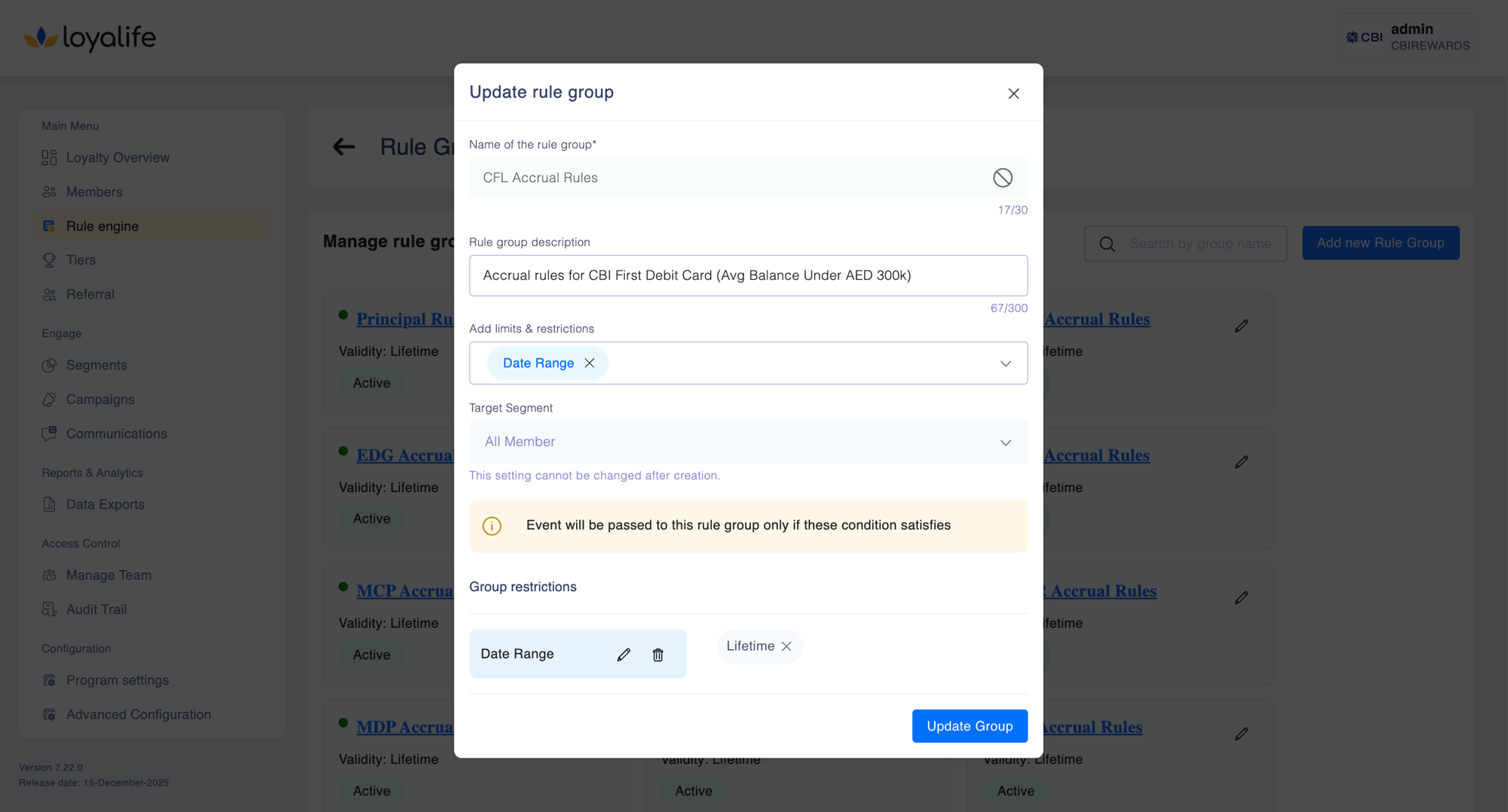
Enter a name and optional description. Choose a linked segment if the group should only apply to a specific audience.
Set point limit, daily cap, monthly cap, or lifetime cap if you want to constrain total earning from this group.
Save the group, then add individual earning rules to it using the rule builder.
## Why rule groups matter
Without rule groups, all rules would apply to every member in the program. Rule groups solve three problems that a flat rule list cannot:
| Problem | How rule groups solve it |
| --------------------------------------------------- | ---------------------------------------------------------------------------------------------------------------------------------- |
| **Different earning rates for different audiences** | Link a rule group to a segment — only members in that segment earn from those rules |
| **Preventing over-earning across multiple rules** | Group-level caps limit total earning per member across all rules in the group, per day, month, or lifetime |
| **Organising complexity** | Separate rule groups for base earning, promotions, partner schemes, and seasonal offers — each independently managed and togglable |
## How rule group evaluation works
When a transaction arrives, Loyalife:
1. Identifies all **active** rule groups
2. For each group with a linked segment, checks whether the transacting member is in that segment
3. Evaluates every rule inside each qualifying group
4. Awards rewards from all matching rules across all qualifying groups **simultaneously**
A member can earn from multiple rule groups in a single transaction. For example, a Gold tier member can earn base points from an "All Members" group and a tier bonus from a "Gold Members" group at the same time — as long as both groups are active and the member is in each group's segment.
## Rule group properties
| Property | Description |
| ------------------ | ----------------------------------------------------------------------------------------- |
| **Name** | Internal label shown in reports, audit logs, and the maker-checker queue |
| **Description** | Optional explanation of the group's purpose |
| **Linked Segment** | If set, rules only apply to members in this segment. Leave unset to apply to all members. |
| **Point Limit** | Maximum points a member can earn from this group per transaction |
| **Daily Cap** | Maximum points per member per day across all rules in this group |
| **Monthly Cap** | Maximum points per member per calendar month |
| **Lifetime Cap** | Maximum points per member ever — once reached, no further earning from this group |
| **Status** | Active or Inactive — toggling pauses all rules in the group instantly |
Group-level caps are distinct from rule-level caps. A rule-level cap limits earning per transaction for that specific rule. A group-level cap limits total earning across all rules in the group combined, over a time period.
## Designing rule groups
A well-designed program typically uses several rule groups with clearly separated purposes:
```
Rule Group: Base Earning (no segment — applies to all members)
└── Rule: 1 point per ₹1 spent
Rule Group: Gold Member Promotions (segment: Gold tier)
└── Rule: 2x multiplier on weekends
└── Rule: 500 bonus points on birthday
Rule Group: New Member Welcome (segment: Enrolled in last 30 days)
└── Rule: 3x points on first 3 transactions
Rule Group: Partner Scheme – Brand X (segment: Brand X customers)
└── Rule: 5 points per ₹1 at Brand X outlets
```
Each group is managed independently. Pausing **Gold Member Promotions** has no effect on **Base Earning**. Enabling a new seasonal group for a limited campaign doesn't require touching existing groups.
## Creating a rule group
Select **Rule Engine** from the left sidebar.
Enter a name and optional description. Choose a linked segment if the group should only apply to a specific audience.
Set point limit, daily cap, monthly cap, or lifetime cap if you want to constrain total earning from this group.
Save the group, then add individual earning rules to it using the rule builder.
 ## Creating a rule group from the Segment flow
You can also create a rule group directly while building a segment. Use the **+ Create New Rule Group** button inside the segment creation form. The group is automatically linked to the parent segment. After creation, go to Rule Engine to add earning rules to the group.
## Activating and deactivating
Toggling a rule group between Active and Inactive takes effect immediately for new transactions. It does not retroactively apply or reverse points already awarded from rules in that group.
When the Maker-Checker workflow is enabled for the Rule Engine, activating or deactivating a rule group requires approval before taking effect.
## Creating a rule group from the Segment flow
You can also create a rule group directly while building a segment. Use the **+ Create New Rule Group** button inside the segment creation form. The group is automatically linked to the parent segment. After creation, go to Rule Engine to add earning rules to the group.
## Activating and deactivating
Toggling a rule group between Active and Inactive takes effect immediately for new transactions. It does not retroactively apply or reverse points already awarded from rules in that group.
When the Maker-Checker workflow is enabled for the Rule Engine, activating or deactivating a rule group requires approval before taking effect.