The Rule Engine is the core of your loyalty program’s incentive structure. It lets you create conditions-based rules — “if a transaction meets these criteria, apply this reward” — without any code. Rules support simple flat-rate earning, tiered multipliers, milestone bonuses, birthday cashback, and time-targeted promotions.

How it works

When a transaction arrives (via API or file upload), Loyalife evaluates all active rule groups whose linked segment includes the transacting member. Matching rules determine how many points, what cashback percentage, or what bonus applies. Results are posted to the member’s account immediately. Example — retail loyalty program:
  • Earn 2 points per ₹1 spent at any time
  • Earn an additional 1% cashback on transactions above ₹5,000
  • Earn 500 bonus points on the member’s birthday month
  • Earn a 25% cashback on every 20th order in a calendar month
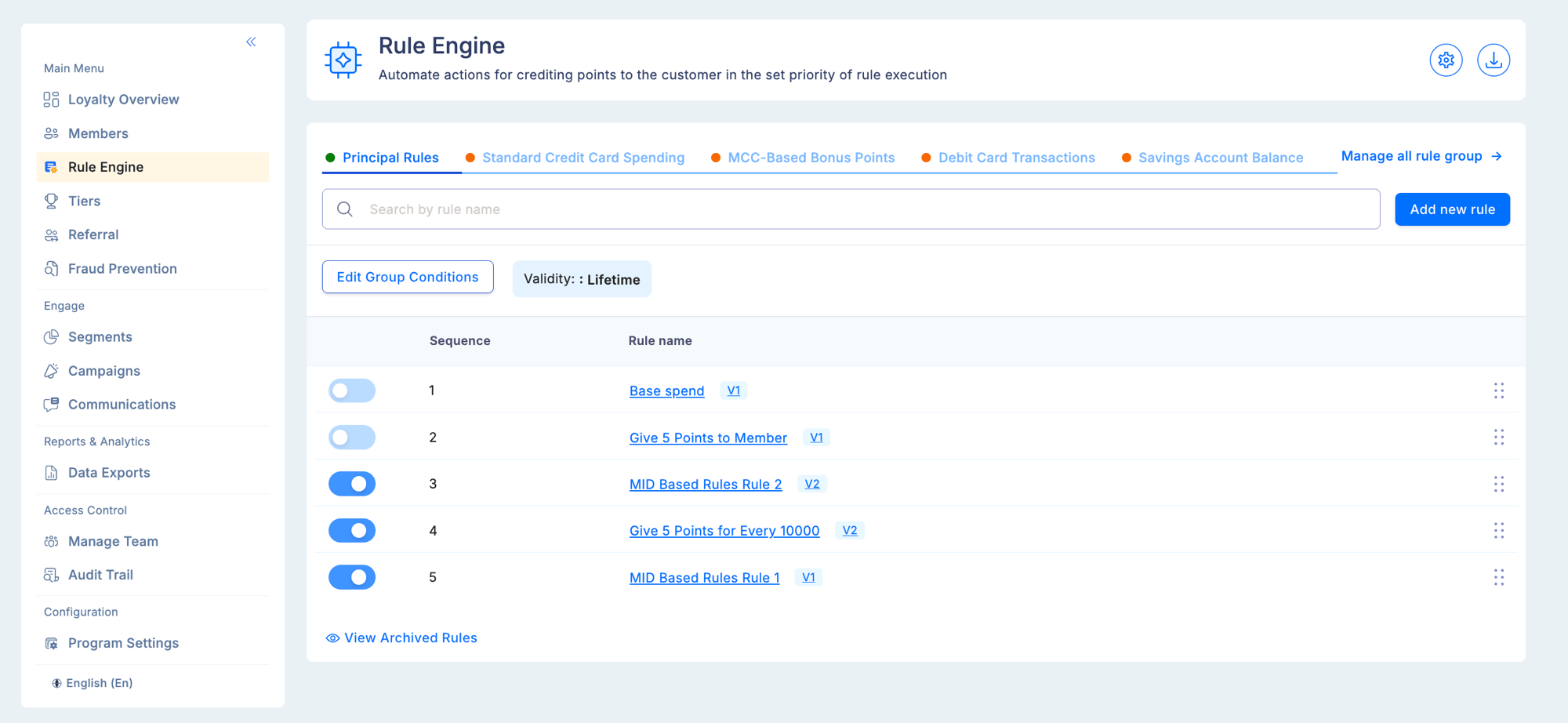
Each is a separate rule inside the same rule group. All evaluate simultaneously for each transaction.
Rule Engine screen with rule groups shown as tabs at the top and individual rules listed in sequence order within the selected group, with toggle controls to activate or deactivate each rule

Core components

Attributes

Data variables that carry information about transactions and members. Attributes are the inputs that rules evaluate.

Rule Groups

Named containers that hold related rules. Can be linked to a specific segment so rules only apply to a targeted audience.

Earning Rules

IF/THEN logic statements: if conditions are met, award the defined reward. Each rule has conditions, a reward type, and optional limits.

Building an earning rule

IF conditions

Each condition has three parts:
PartDescription
AttributeThe data point to check (e.g., Transaction Amount, MCC, Transaction Date)
OperatorHow to compare (equals, greater than, contains, between, is multiple of)
ValueA static threshold, or another member attribute for dynamic comparisons
Multiple conditions combine with AND (all must be true) or OR (any must be true). Every rule condition evaluates a combination of transaction attributes and member attributes — what happened in the transaction, and who the member is. This is what makes the Rule Engine powerful: a single rule can simultaneously check “was the transaction amount above ₹5,000?” (transaction attribute) and “is the member in the Gold tier?” (member attribute) and “has the member transacted more than 10 times this month?” (aggregate attribute). Supported attribute categories:
CategorySourceExamples
Transaction attributesSubmitted with each transaction via API or TXN fileTransaction Amount, Transaction Date, Product Code, Sub Product Code, Transaction Type, Relation Reference, Transaction Id
Custom transaction attributesDefined by you in Rule Engine → AttributesMerchant Name, MCC Code, Channel, Store ID, any program-specific transaction field
Member (global) attributesBuilt-in member profile fieldsDate of Birth, Gender, Status, Preferred Language
Member (custom) attributesDefined by you in Members → AttributesOccupation, region, card type, any program-specific member field
Aggregate attributesComputed from transaction historyMonthly Spend Sum, Transaction Count (MTD/YTD), Average Transaction Value

Operators

OperatorApplies toDescription
Equals / Not EqualsAll typesExact match or exclusion
Greater Than / Less ThanNumbers, DatesThreshold comparison
BetweenNumbers, DatesInclusive range check
ContainsTextSubstring match (e.g., merchant name contains “Fuel”)
Is Multiple OfNumbersMatches every Nth value — used for milestone rewards

Date and time conditions

The Transaction Date attribute supports combined date and time values. The date picker opens with a calendar plus an embedded time selector (HH:MM, 24-hour format) below the grid.
Picker elementBehavior
CalendarSelect the date as usual
Time selector (HH:MM)Hour range 00–23, minute range 00–59
Default time00:00 (midnight)
Today buttonSets current date + current time
Apply buttonConfirms and closes the picker
Combined displayShows as MM/DD/YYYY HH:MM in the condition field
For the between operator, both start and end pickers include their own time selectors. Existing rules with date-only values continue to work as-is — they are treated as 00:00 by default. Example use cases:
Rule conditionValue enteredMeaning
Transaction Date >04/22/2026 18:00Only transactions after 6 PM on April 22
Transaction Date between04/01/2026 00:00 → 04/30/2026 23:59All of April
Transaction Date =04/22/2026 14:30Exactly at 2:30 PM on April 22

Dynamic attribute comparisons — birthday and anniversary rules

Instead of comparing an attribute to a fixed value, you can compare it to another member attribute. This enables rules like birthday cashback or card anniversary bonuses. Birthday cashback example:
Condition 1: Transaction Date [Date of Month]   Equals   Date of Birth [Date of Month]
Condition 2: Transaction Date [Month of Year]   Equals   Date of Birth [Month of Year]
THEN: 35% cashback
Constraints for dynamic comparisons:
ConstraintRule
No self-comparisonAn attribute cannot compare to itself
Type compatibilityLeft and right must be the same data type (Date ↔ Date, Number ↔ Number)
Date type lockIf the left side uses [Date of Month], the right side auto-locks to [Date of Month]
Operator restrictionsContains and Is Multiple Of are not available for attribute-to-attribute comparisons
Edge cases for birthday rules:
ScenarioBehavior
Date of Birth not set in member profileCondition evaluates to false — no birthday reward
Member born on Feb 29No birthday reward in non-leap years
Profile DOB updated mid-month (reward already issued)Next reward on the new date, following year
Supplementary card transactionUses the DOB of the primary account linked to that card

Milestone rewards (Is Multiple Of)

The Is Multiple Of operator fires a rule every time an aggregate count or sum hits a multiple of your configured value. The current transaction is included in the aggregate before evaluation. Reversals and refunds adjust the aggregate automatically. Example — reward every 20th order per month:
Attribute: Monthly Order Count
Operator:  Is Multiple Of
Value:     20
Reward:    25% cashback (capped at ₹500 per transaction)
This fires on the 20th, 40th, 60th order, and so on.
An implicit Count > 0 guard is added automatically when you use Is Multiple Of to prevent zero from incorrectly matching (since 0 is technically a multiple of any number).

THEN reward

Reward typeInternal nameDescription
Flat PointsflatA fixed number of points regardless of transaction amount
MultipliermutipleMultiplies the transaction amount (or base earning) by the configured factor to calculate points
For EveryattributeValueAwards a fixed number of points for every N units of an attribute value (e.g., 1 point for every ₹10 spent)
Value type for the THEN condition:
Value typeDescription
Static valueA fixed number configured in the rule
Match attributeThe value is drawn from a member attribute at the time of transaction evaluation

Restrictions

Each earning rule can carry one or more restrictions that limit when and how much the rule fires. Add restrictions from the Restrictions section of the rule builder.
Restriction typeWhat it does
Point Limit (MaximumPoints)Sets a hard cap on the maximum points a single transaction can earn from this rule
Date RangeRestricts the rule to only fire within a specific start–end date window
Calculation TimingControls when points are posted after a qualifying transaction (e.g., immediately vs. after a holding period)
Product CodesRestricts the rule to only fire for transactions with specific product codes
Sub Product CodesFurther narrows to specific sub-product codes within a product category
Combining restrictions: Multiple restrictions are evaluated together with AND logic — a transaction must satisfy all active restrictions for the rule to fire. For example, a rule restricted to a date range AND specific product codes will only fire for qualifying products within that time window.
Restrictions layer on top of IF conditions, not instead of them. A transaction must first pass all IF conditions, then pass all active restrictions, before the THEN reward is applied.

Limits and caps

LevelLimit typeDescription
RulePer transactionMaximum earning per single transaction
RuleVelocityMaximum qualifying transactions per period
GroupDailyMaximum group earning per member per day
GroupMonthlyMaximum group earning per member per month
GroupLifetimeMaximum group earning per member ever

Activating and deactivating rules

Changes to rule status (active/inactive) take effect immediately for new transactions. They do not retroactively apply or reverse points already awarded.

Troubleshooting

A rule is not firing on expected transactions.
  • Confirm the rule group is set to Active.
  • Check whether the group has a linked segment — the transacting member must be in that segment.
  • Review all condition operators and values carefully, especially date formats and time values.
  • Check whether a group-level cap for this member has already been reached.
A member is earning on transactions that should be excluded.
  • Identify all active rule groups with no segment restriction — they apply to every member.
  • Look for overlapping conditions that inadvertently match.
Birthday rule is not firing.
  • Confirm the member’s Date of Birth is populated in their profile.
  • Members born on February 29 receive no birthday reward in non-leap years.
  • If the DOB was updated mid-month after the reward was already issued, the new date takes effect the following year.